My calendar is a true nightmare. I travel a lot, some of it for my job, some of it for fun, and some of it because I’ve been managing a long distance relationship for years. Traveling a lot means it’s always hard for your loved ones or coworkers to know what time zone you’re in or when you’re on a plane. Managing a relationship across timezones means having to do constant mental math that is way harder than it needs to be. And because I don’t have an assistant, I’ve become frustrated with double entry of flights, trains, blockers for boarding flights or traveling to the airport, and so on.
As someone who travels a lot, it’s also one of those things where statistically speaking, the chances of me being on a plane whenever some newsworthy event happens is higher than for the average person. I want my wife, friends, coworkers to know what flights I’m on and what cities I’m in. I’ve survived one terror attack, nearly dodged two others and a mass shooting. It’s one of those things where I want to make sure people who care about me can check in easily to see where I am.
The thing is, calendar systems suck. All of them. The standards are a holdover from two computing generations ago, the frontend ecosystem is a mess of rent-seeking monthly subscription mobile apps with dubious features, and the user experience for most systems is pretty much terrible. Just as an example: if I book a flight, my email provider makes a calendar entry, but it often misses the connection flight or gets the timezones wrong, and even if it doens’t fail, it doesn’t make me the organizer, meaning I can’t share or modify it. The entire calendar ecosystem is a nightmare.
The sad thing is that in the entire space there’s really two good products: Google Calendar has basically captured the market for diary entries, and Facebook Events would be an admirable tool if it wasn’t attached to a company and service fuelled with undistilled demon blood. I’m trying to break off of big tech as much as I can, so I needed some kind of solution.
So I built my own. Kind of. I intend this to be the first part of a long-running series of how I’m building my own tech to regain control of my data.
My core requirements:
- Allow events to show up as blockers in my work calendar;
- Allow my wife to subscribe to the calendar;
- Enter events at most once;
- Allow editing from multiple devices;
- Fully control my own data;
- Cannot solve problem by sharing work calendar with my wife.
Additional requirements:
- Import .ics attachments from email;
- Import .ics over HTTP from my language school calendar;
- Import data automatically from my self-hosted flight tracker, Airtrail;
- Color code events in my work calendar;
- Allow some events to be flagged as private for my work calendar;
- Refresh frequently;
- Use any front end.
The big problem with existing calendar sharing solutions is that they require everyone to be on a common platform, like the broader Gmail or Outlook.com ecosystems, or share accounts in the same environment, like an Exchange environment, in order to have full functionality. The two common workarounds for this is either to publish a calendar in a “read only” mode by serving iCal data over HTTP, or to email iCal .ics files to recipients over email.
For my beta version of this calendar system I chose the former: I would host an .ics file on my website under a public but secret and unguessable URL, or actually multiple URLs for different use cases. I could then share the link or subscribe to it with my work account. To populate the calendar, I started writing out events in YAML and would generate a URL for each person I wanted to share it with:
- name: World Aviation Festival
  begin: 2024-10-07
  end: 2024-10-10
  city: Amsterdam
  event:
    name: World Aviation Festival Conference Day
    type: CONFERENCE
    begin: 2024-10-08T08:30:00+02:00
    end: 2024-10-08T18:00:00+02:00
    location: |
      RAI Exhibition and Convention Centre
      Halls 1 & 5 | Europaplein 24, Amsterdam
    repeat:
      count: 3
      frequency: daily
  flights:
    - flight number: LH2310
      departure:
        airport: MUC
        time: 2024-10-07T20:05:00+02:00
      arrival:
        airport: AMS
        time: 2024-10-07T21:40:00+02:00
    - flight number: LH2305
      departure:
        airport: AMS
        time: 2024-10-10T15:40:00+02:00
      arrival:
        airport: MUC
        time: 2024-10-10T17:05:00+02:00
    - flight number: LH1952
      departure:
        airport: MUC
        time: 2024-10-10T18:00:00+02:00
      arrival:
        airport: BER
        time: 2024-10-10T19:05:00+02:00
  hotel:
    - name: Sheraton Amsterdam Airport Hotel And Conference Center
      address: Schiphol Boulevard 101, Schiphol, 1, Netherlands 1118
  share:
    - Christine
    - Work
    - Em
I’d take this YAML file and wrote a small script to re-serialize it as an ICS file in my CI/CD pipeline.
This worked for a while, but it got unweildly. Hand-writing YAML is fine for prototyping, but at scale it was too frequent that I would make mistakes, and this was a lot of work for what should be a fairly low-effort exercise. I needed a new solution.
For my new solution, I knew I would need to move away from my static solution and would need to run something hosted. Even though that would cost me more, I’ve come to accept that moving off of big tech will eventually require me to host my own solutions for a variety of needs. So I decided to jump into the world of CalDAV.
CalDAV is an extension of the WebDAV distributed authoring specification with specific functionality relevant to calendar applications. WebDAV was an idea that emerged from the 90s, when web development was still very synchronous and web development felt more like software development. Nevertheless, it’s one of the few available solutions for running a self-hosted calendaring system.
Aside: This is an area begging for disruption. Just look at this list of CalDAV and CardDAV implementations on Wikipedia. It’s bleak out there, folks. No wonder why data aggregators under the guise of third party tools like Calendly and Doodle are so popular. The landscape is flat awful. Anyways.
With a CalDAV server, I can connect to it with frontend apps of my choosing from multiple devices. This will allow me to view and manage events from my laptop, phone, or whatever. But few CalDAV servers allow authentication-free subscriptions to the calendar with any ease. So I’ll need to have a script that regularly polls the server, extracts the events, and publishes them as an iCal file through my website.
Moreover, I’ll want to connect to various other data sources, some of which I control and others I do not. These include my flight tracker (self-hosted), my email (paid hosting), and my language school (external). The flow that I’ll build will look something like this:
- poll data sources for events
- publish events programmatically to CalDAV
- fetch all events from CalDAV and write to an .ics file
- serve .ics file over HTTP
To accomplish this, I’ve designed an architecture that looks something like this:
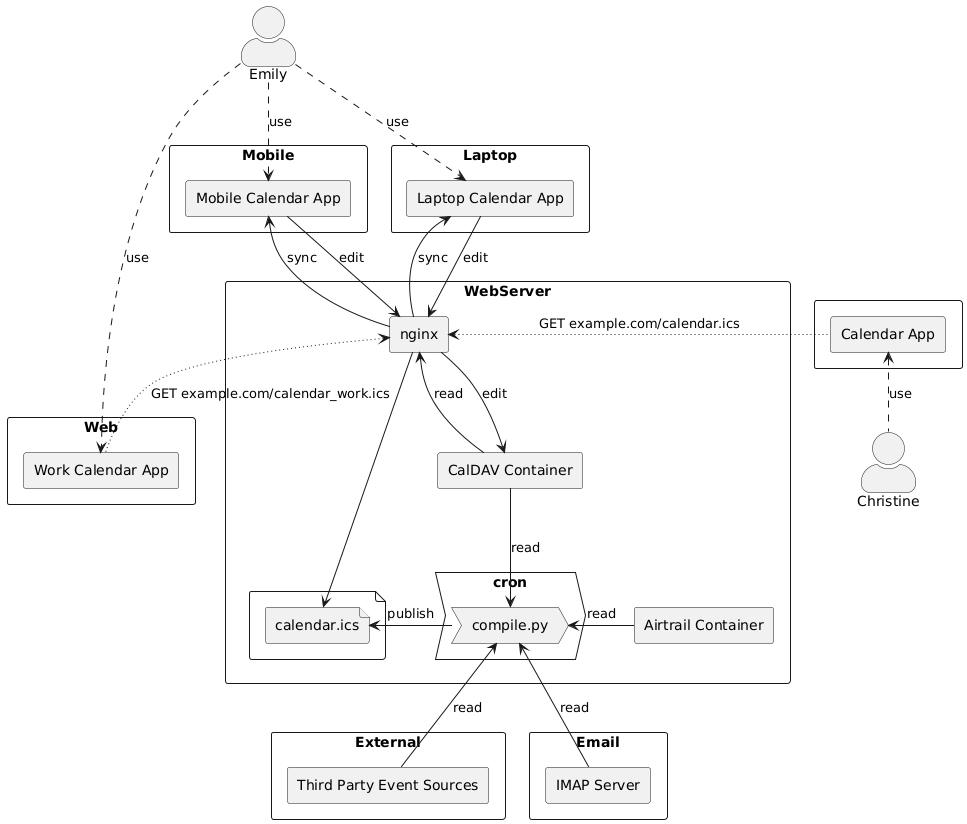
My tool of choice was Baïkal, a lightweight, self-hostable CalDAV (and CardDAV) server for managing calendars and contacts. Setting up the service was easy with Docker Compose:
services:
  baikal:
    image: ckulka/baikal:0.9.5
    restart: always
    ports:
      - "XXXX:80"
    volumes:
      - /mnt/baikal/data:/var/www/baikal/config
      - /mnt/baikal/data:/var/www/baikal/Specific

volumes:
  config:
  data:
You can configure Baïkal to use MySQL, but it also works fine with SQLLite, and this simplifies its administration. Set the port and modify the local volume if you want and start this with a simple docker compose up -d.
To make this available to the web, I’m running an nginx reverse proxy with a pretty basic configuration:
server {
    server_name MYDOMAIN;

    location / {
        proxy_pass http://localhost:XXXX;
        proxy_set_header Host $http_host;
        proxy_set_header X-Forwarded-Proto $scheme;
    }

    location /.well-known/caldav {
       return 301 https://MYDOMAIN/dav.php;
    }

    listen 80;
    listen [::]:80;
}
Of course, I used Let’s Encrypt to get this served securely, but I omitted this for simplicity. If you want to do the same, replace MYDOMAIN with whatever your subdomain/domain is.
One note: you’ll notice the location directive that performs a 301 redirect to dav.php. This /.well-known/caldav redirect is needed if you want to add this calendar to your iPhone or Mac calendar apps. When eventually setting up your calendar on MacOS or iOS, you’ll want to use manual settings, not automatic (and not advanced—I’m not sure why I couldn’t get the advanced settings to work when the manual settings worked fine).
I set up DNS and used certbot to generate a Let’s Encrypt certificate for my domain and it updated the nginx config file automatically.
Once this is up and running, I was able to navigate to my domain in my browser to set up an admin account. From there, I configured a user for myself and created a calendar. Theoretically, I could create multiple calendars if I chose to, for instance if I wanted to have a special calendar for travel or whatnot. But I didn’t find that necessary, as my goal is at-most-once data entry. To get the URL for my calendar, I had to navigate through to my user page, click the “Calendars” button, and then found it under the little info icon.
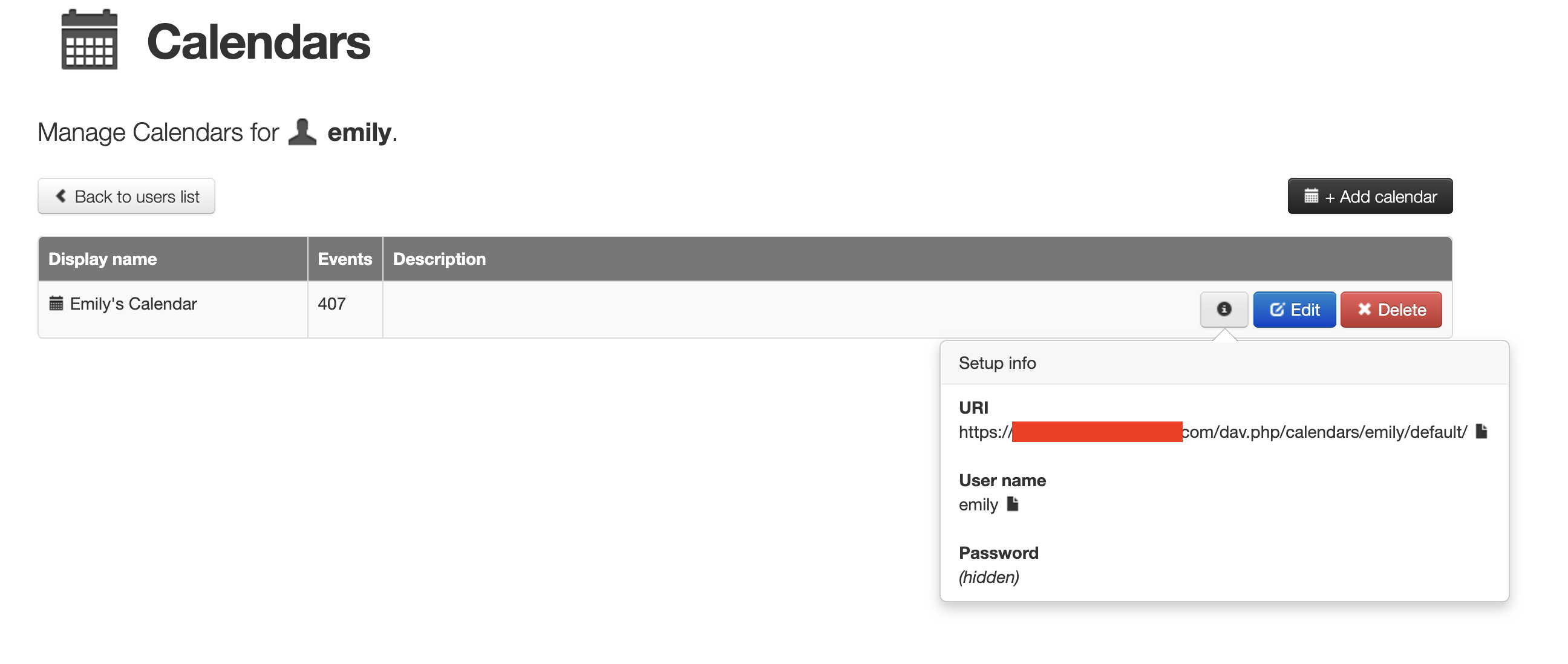
I hooked this up to my iOS and MacOS default calendar apps and everything went swimmingly.
I’ll take a little detour here for another rant. The iCalendar specification includes a provision for an optional CATEGORIES property for the EVENT component. The intention of this property appears to be to provide the ability for a user to categorize an event, such as an appointment, meeting, etc. This would be a really useful feature in a calendar frontend; I could easily search for and find a doctor appointment in a busy week, for instance. However, most frontends and calendar apps simply do not implement this feature in any way. MacOS Calendar does not. iOS Calendar does not. Google Calendar does not. Every tool I’ve used has completely ignored this otherwise useful field.
I want to use this field.
But there’s an issue with free text taxonimization: it sucks. It’s really hard to keep it consistent. It’s really hard to make it contextual meaningful while also being unambiguous, let alone universally understandable. So I need to do something about this.
Since I’m going to need to write some python scripts to extract calendar events anyways, it makes sense that I could try to encode these event types in a data model. So I wrote a little data model for this using python enums, an excerpt of which is here, forgive the random German:
from enum import Enum

class TerminType(Enum):
    MEETUP = 1
    CONFERENCE = 2
    CLASS = 3
    TRAINING = 4
    APPOINTMENT = 10 # values 10 or higher are set private for my work calendar
    MEETING = 11
    EXAM = 12
    HEARING = 13
    INTERVIEW = 14

    def __str__(self):
        return self.name

class CultureType(Enum):
    MOVIE = 1
    CONCERT = 2
    SPORTS = 3
    MUSEUM = 4
    ENTERTAINMENT = 5

    def __str__(self):
        return self.name

class SocialType(Enum):
    ...

class AwayType(Enum):
    ...

class TransportType(Enum):
    ...

all_event_names = set(TerminType._member_names_) \
                    .union(set(CultureType._member_names_)) \
                    .union(set(SocialType._member_names_)) \
                    .union(set(AwayType._member_names_)) \
                    .union(set(TransportType._member_names_))
There’s no real reason for breaking things down like this, except that it helps conceptually organize the types of events. Moreover, I do implement a little bit of hidden business logic: double-digit enum values are private by default for my work calendar.
Building this taxonomy will help me to implement an ad hoc solution to the problem described before: it will help me make events more searchable or visible at a glance for front-ends that allow you to color code events.
I’ve said a few times that I want to do “at most once” data entry. This means that there are many events I don’t want to have to enter data for at all, such as scheduled classes with my online language school (which hosts an ICS file of my classes) or events extracted from my email. But to automate getting this data I need to poll these endpoints, as they don’t really publish events when new ones are added or old ones are deleted. This means I’ll need to write a little python script and hook it up to a cron job.
The python script needs a few components:
- a component for fetching events from my email over IMAP;
- a component for extracting events from my flight tracker’s API;
- a component for fetching events from my language school’s hosted ICS files;
- a component for pushing all of these events to Baïkal; and
- a component for fetching all events from Baïkal and re-serializing them to one or more sharable ICS files published undiscoverably on the web.
The IMAP part is really nice, this provides Google Calendar-like functionality to this system. If someone emails me a calendar invite, this script fetches it and adds it to my calendar automatically.
This is a lot of code, most of it ad hoc, I won’t share it here all but it’s not so hard to write. What I will share is the entrypoint script for the cron job:
from enum import Enum
from ics import Calendar, Event

import event_types as Categories
import airtrail
import baikal
import imap

def is_work_public(event : Event) -> bool:
    def get_value(type : Enum, category):
        try:
            return type[category].value < 10
        except:
            return False

    if not event.categories:
        return False

    return all((get_value(Categories.TerminType, c) |
                get_value(Categories.AwayType, c) |
                get_value(Categories.TransportType, c))
               for c in event.categories)

if __name__ == "__main__":
    family = Calendar()
    work = Calendar()

    # these add events to baikal directly
    airtrail.fetch_airtrail_events()
    imap.fetch_email_events()
    # I left out my language school fetcher because it's not active at the moment

    events = baikal.fetch_remote_events()

    for event in events:
        family.events.add(event)

        if "[email protected]" not in event.serialize():
            if is_work_public(event):
                event.classification = "PUBLIC"
            else:
                event.classification = "PRIVATE"
            work.events.add(event)

    try:
        with open("/www/calendar/emilygorcenski.ics", "wt") as ics_file:
            ics_file.write(family.serialize())
        with open("/www/calendar/emilygorcenski_work.ics", "wt") as ics_file:
            ics_file.write(work.serialize())
    except:
        pass
And the script to interface with Baïkal:
import os
import re
import requests
import xml.etree.ElementTree as ET
from dotenv import load_dotenv
from ics import Calendar, Event
from requests.auth import HTTPDigestAuth
from event_types import all_event_names

load_dotenv()

# Baikal server information
USERNAME = os.environ["BAIKAL_USERNAME"]
PASSWORD = os.environ["BAIKAL_PASSWORD"]
BASE_URL = os.environ["BAIKAL_URL"]

HEADERS = {
    "Content-Type": "application/xml; charset=utf-8",
    "Depth": "infinity"
}

PROPFIND_BODY = """<?xml version="1.0" encoding="utf-8"?>
<d:propfind xmlns:d="DAV:" xmlns:c="urn:ietf:params:xml:ns:caldav">
    <d:prop>
        <d:displayname/>
        <c:calendar-data/>
    </d:prop>
</d:propfind>
"""

def categorize(event : Event) -> Event:
    # ignores any user-input values that we don't care about, and focuses on what we do
    # this is to convert the description field in an event into categories fields
    # this allows manual categorization by editing the event description
    if not event.description:
        return event
    category_match = re.search(r'\b(CATEGORIES:)(\S+)\b', event.description)
    if category_match:
        label = category_match.group(1) # this should always be "CATEGORIES:""
        cat_list = category_match.group(2)
        categories = set(cat_list.split(","))
        event.categories = categories.intersection(all_event_names)
        event.description = event.description \
                                 .replace(label + cat_list, "") \
                                 .replace("  ", " ") \
                                 .strip()
    return event

def fetch_remote_events() -> list[Event]:
    response = requests.request("PROPFIND",
                                BASE_URL,
                                headers=HEADERS,
                                data=PROPFIND_BODY,
                                auth=HTTPDigestAuth(USERNAME, PASSWORD))

    if response.ok:
        root = ET.fromstring(response.content)

        propstats       = [r.find('{DAV:}propstat')
                           for r in root.findall('{DAV:}response')]
        calendar_data   = [p
                           .find('{DAV:}prop')
                           .find('{urn:ietf:params:xml:ns:caldav}calendar-data')
                           for p in filter(lambda x: x is not None, propstats)]
        events          = [categorize(event)
                           for data in filter(lambda x: x is not None, calendar_data)
                           for event in Calendar(data.text).events]
        return events
    return []

def add_event(filename : str, event_ics : str):
    header = {
        "Content-Type": "text/calendar; charset=utf-8"
    }
    event_ics = event_ics.replace("METHOD:REQUEST\r\n", "")

    r = requests.put(f"{BASE_URL}{filename}",
                     data=event_ics,
                     headers=header,
                     auth=HTTPDigestAuth(USERNAME, PASSWORD))
    return r.status_code
Note how I make sure that certain kinds of events (e.g. doctor appointments) are marked private and serialized to a separate file in my work calendar.
I then set up a redirect in nginx for serving these files via an unfindable URL, generated from a random, hashed and salted string.
I run this via a cron job every 15 minutes.
The whole point of this exercise wasn’t just that I could see events, but also that any events I put in my calendar will block my work calendar and be visible to coworkers so they know if I’m on a flight or traveling in another city. To do that, I need to copy these events to my work calendar.
This is a bit of an irony, because this whole exercise started when I was trying to reduce my dependency on Google Calendar. However, in fairness, Google Calendar is a choice of my workplace, and it’s not something I depend on outside of work. I’m not thrilled to give the data to Google, but at least I can walk away from them easily if I choose to.
To accomplish this, I’m using Google Script Engine and a modified version of this open source script. In all honesty, I struggle with how this Javascript code is organized, but it gets the job done with minimal difficulty. I did modify this to read from the calendar CATEGORIES property and color code my calendar. The result means it’s really easy to parse my calendar at a glance—obviously I’m only sharing a small snippet of non-sensitive information.
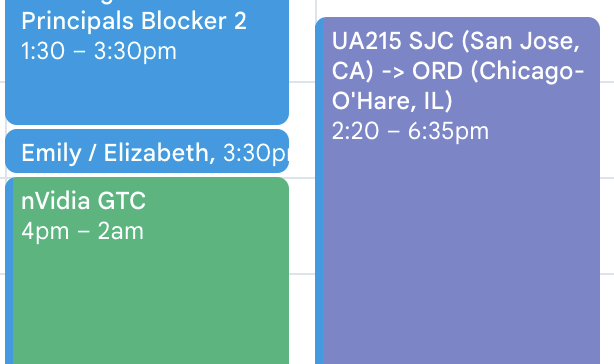
I have this Google Script running on 30 minute intervals.
I’ve been hacking around with this system for the last 6 months or so and making small tweaks and additions here or there in the meanwhile. I have to say, it works really great. The lastest update I made was integrating Airtrail via API. Now, when I book a flight, I enter the data into my flight tracker and within 15 minutes it’s added to my calendar, and within the hour it’s automatically copied to my work calendar. This is a huge quality of life improvement that saves me a ton of time in logistics management with my complicated travel requirements.
The overall cost of this system is pretty minimal. I’d imagine you can set this up and run it easily from a NAS at home if you want, but I opt to keep my data safely protected in Switzerland, so I subscribe to about $100 monthly of server time to run my websites and all my integrations. That’s a bit overkill—I can definitely optimize these costs and will do so over time, but the ease of getting everything set up on a docker host in a VM instance on a hosting provider was worth the extra money. And I’m easily saving $100 monthly in time just for making managing my schedule easier.
It’s not a perfect solution, but damn if it’s better than anything else I’ve tried yet.
Let me know if you ever try something similar!