In May 2025, we merged a PR at Nango that had a critical bug: an if condition that never fired prevented refreshed credentials from being saved to the database. We caught the bug and reverted it in just under two hours.
In those two hours, our scheduled jobs had refreshed and discarded access and refresh tokens for hundreds of connections. For most APIs, that was recoverable: the old refresh token still worked, so the next scheduled refresh repaired the connection.
Then we learned how many providers rotate refresh tokens.

Many providers, including Airtable and Atlassian, invalidate the old refresh token the moment a replacement is issued. Salesforce and Slack can do the same when rotation is enabled for the OAuth app.
There was no way to get those tokens back. For every affected connection, our customers had to ask their users to go through the consent screen again.
OAuth is a standard, but OAuth providers are not interchangeable. Each API’s auth behaves a little differently, and some of those differences are undocumented and only surface in production.
For context, Nango is an open-source project that lets web applications and agents integrate with third-party APIs. Our customers embed it in their products. Their users connect third-party accounts, and Nango keeps those connections working.
Since then, we’ve grown from supporting about 400 APIs to 1,000+ APIs. The incident changed how we operate auth, but it was only the first of several lessons.
Lesson 1: Token rotation makes ordinary bugs irreversible
Refresh token rotation is a security win, but a bug in the rotation path can permanently destroy a connection and force the user to reauthorize. That’s what made our incident so expensive.
We now treat refresh tokens like money, not cache. The new token gets persisted before anything else can fail. The persistence path has its own regression tests, and any platform-level refresh anomalies immediately page the on-call team.
Providers enforce refresh-token rotation differently
Take Airtable: a refresh request with a stale token or the wrong client credentials can return a 400 or 401, but Airtable doesn’t stop there. It revokes the user’s entire authorization for your app, and the only way back is for the user to reconnect. Sending the same refresh request twice can also cause revocation. Airtable documents a short grace period for duplicate refreshes, but retrying the stale token after that period revokes the authorization.
Airtable also invalidates the old access token the instant a refresh succeeds, so a long-running job still using an old token can fail mid-run.
Xero handles it better: if a refresh fails or the response never arrives, you can retry with the previous refresh token for up to 30 minutes.
Issues like these pushed us to serialize refreshes per connection behind a distributed lock.
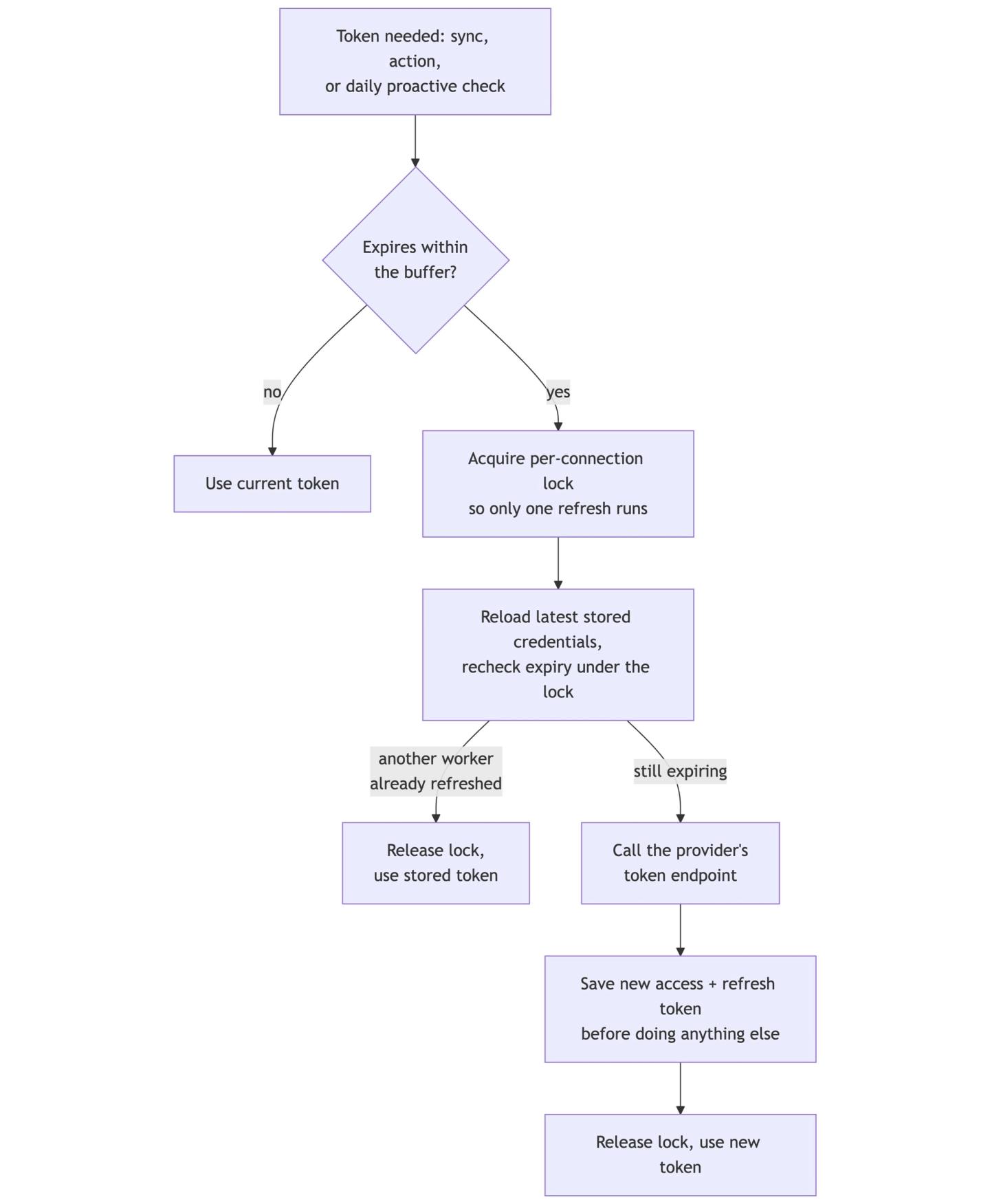
*This is only the success path. Failure paths don’t fit in one diagram.
Even refreshing early can be wrong. For example, Exact Online’s access tokens last for 10 minutes, and its token endpoint rejects any refresh attempt made more than 30 seconds before expiry. Our “refresh 15 minutes early” rule meant every refresh fell outside that window and was rejected. We had to add support for per-provider expiration buffers.
Lesson 2: You can’t reliably know when access tokens expire
The official OAuth 2.0 spec (RFC 6749) makes expires_in optional for access tokens. For us, this has been a recurring source of silent breakage.
Zendesk, for example, rolled out expiring access tokens for OAuth clients, including existing ones. Its token response includes expires_in only if you request it. Without that parameter, the access token still expires under the default policy, but the response doesn’t say when. We discovered this only after the rotating refresh token lapsed and connections started dying.
Salesforce’s token response includes no expiry. The documented way to check it is a separate introspection endpoint, which we call before deciding whether to refresh an access token.
POST /services/oauth2/introspect HTTP/1.1
Host: yourInstance.my.salesforce.com
Authorization: Basic <base64 of client_id:client_secret>
Content-Type: application/x-www-form-urlencoded

token=<access_token>&token_type_hint=access_token
Sample response:
{
	"active": true,
	"scope": "id api refresh_token",
	"exp": 1549921091,
	"iat": 1549917491,
	"token_type": "Bearer",
	"client_id": "xxxxxxxxxxxxxxxxxxxx"
}
But in June 2024, the introspection endpoint started intermittently returning unsupported_token_type for some tokens. When introspection failed, we refreshed anyway. The replacement access token could be introspected normally, though we never learned why the original token failed.
Refresh token lifetimes are just as inconsistent
- NetSuite’s OAuth refresh tokens expire after 7 days, requiring full re-consent, which is why many teams use its token-based authentication instead.
- Google’s refresh tokens live indefinitely, except under documented conditions, including the app being in “Testing” status, six months without use, or a user exceeding 100 live refresh tokens for your client.
We now refresh stale credentials on a cron, so tokens get exercised before inactivity kills them.
Auth failures don’t always look like failures
You’d expect an auth failure to return a 401. It often doesn’t:
- Zoho CRM’s token endpoint returns HTTP 200 with the error in the body.
- Workday and Dayforce return no error at all when a permission policy is missing; the API just returns empty data.
- One SOAP-based API we support returns HTTP 200 for everything, including wrong passwords.
- LastPass does the same, with the failure as plain text in the body. Our credential check for it literally searches the response for the string “Authorization Error”.
We ended up building per-provider heuristics: at the time of this analysis, 276 of the roughly 935 providers in our registry declared an authenticated endpoint that Nango can call to check whether credentials still work.
Lesson 3: Providers make breaking changes to their API auth
16% of commits to our provider config are fixes. There’s no reliable feed for provider auth changes; we often learn about them from a failed flow or a customer report.
Figma announced by email that credentials had to move from the request body to a Basic Authorization header and that the OAuth host was changing. We shipped the update, but anyone who missed the email might not discover the change until refreshes begin failing.
Shopify changed how offline tokens are issued, so apps began receiving expiring tokens where they previously didn’t. We shipped a config change to preserve the old behavior.
Lesson 4: Sometimes you build around the provider, not with it
Supporting a new API assumes two things: you can get credentials to test with, and you can find accurate docs for how its auth works. At our scale, both assumptions fail often enough that going around the provider is routine:
- Salesforce Data Cloud is separately provisioned, and none of our test orgs included it. Its auth requires two chained token exchanges against different hosts. We built a mock server from the documented responses so we could implement and test the flow without live credentials.
- LastPass’s API isn’t really REST: nearly every operation hits the same URL, with the action passed in the request body. That broke an assumption in our proxy that every integration would define individual endpoints, so we added support for APIs with only a base URL.
- A community member found the solution to a recurring Asana OAuth error (
client_id is missing or invalid) in Asana’s support forum and added it to our docs. It wasn’t covered in Asana’s own docs. - Read.ai’s documented authorization URL pointed at their internal developer-testing page. The real endpoint came from querying their OpenID discovery endpoint directly.
If you build an API, ten requests
API clients would fail less often if providers did these ten things:
- Return
expires_in. Always, in seconds. - If you rotate refresh tokens, consider a short, bounded grace period for the previous token, like Xero’s 30 minutes. This absorbs duplicate refreshes at the cost of weaker replay detection during that window.
- Return more specific errors than just
invalid_grant. Revocation, policy failure, expired token: say which one it was in the error body. - Treat auth changes as breaking API changes. Version them, announce them, and don’t apply them retroactively to existing clients.
- Document your revocation triggers. Password resets, per-user token caps, and inactivity windows.
- Offer some way to test against your API without a sales call (even for paid apps).
- Keep your auth documentation public and accurate.
- Make 200 mean success. If your API returns
200 OKwith an error in the body, no generic client can tell it’s broken without special-casing your responses. - Prefer conventional behavior when the specification leaves room for interpretation.
- If REST is your modern API, make it the source of truth. Don’t leave essential functionality only in SOAP or WSDL files.
Our provider registry is public in a single YAML file if you want to inspect the details.