Python on my wrist
I have a PineTime. It is a cheap, open, hackable smartwatch from Pine64.

It’s not an Apple Watch
When people see it, they think: that looks like a smartwatch, so it must be a smartwatch. Like an Apple Watch. It’s not! An Apple Watch costs around 700 USD, and this one 25. Think of it as a programmable Casio with a color display, Bluetooth, a step counter and a heart rate monitor.
It really does not have much CPU or memory: a 64 MHz ARM Cortex-M4, 64 KB of RAM (yes, kilobytes), 512 KB of flash for the firmware and 4 MB of external flash for files. After the Bluetooth stack and MicroPython itself have had their share, about 12 KB of RAM is left for the apps. Everything on this watch has to be small.
The screen is fine, though: 240×240 pixels on 1.3 inches, about 260 pixels per inch. So if anything on it looks blocky in this post, that’s on purpose. However, you can’t have an always-on display: the battery would run out too soon. Apple Watches once had the same limitation, too!
The watch features an app for aforementioned watch monitor and step counter, and you can send notifications to it via Bluetooth.
How I got here
I bought my PineTime in March 2023, for 26.99 USD. It ships with InfiniTime. That’s fine. But InfiniTime is written in C++, and I run a Python group. So I preferred wasp-os, a MicroPython-based watch OS. However, even in 2023 that project was already quite dormant. It was running a 2019 version of MicroPython and was quite hard to build. Recently its maintainer added a note that wasp-os is looking for new maintainers.
Reviving the OS
Then I found my watch in a drawer again, and thought it would be nice to work on it a bit. So I took it upon myself to get wasp-os into shape again. Besides moving to mainline MicroPython (more on that below), this is what changed:
- It builds again. The Python tooling is
managed with
uv, so setting up is one command, and the full build works again, including the bootloader bits. - Faster flashing. Updating the firmware over Bluetooth
now uses
bleak instead of the deprecated
gatttool, and takes about three and a half minutes instead of over eight. When it fails, it tells you why, instead of hiding the errors, as it did before. - More memory. The filesystem on the external flash now uses the chip’s real 4 KB blocks, which got rid of a permanent 4 KB buffer. Free RAM at boot went from 7.1 KB to 12.4 KB. On this watch, that’s a lot!
- It recovers by itself. A watchdog now resets the watch when it hangs, instead of leaving it dead with Bluetooth still up.
- No more buzzing. A swipe could leave the vibration motor buzzing until you reset the watch. That’s fixed, and the motor is driven right now.
- Swipes work reliably. The touch controller now reports when you lift your finger, and in Settings you can swipe along a slider to change it.
- It survives a flat battery. After my holiday, where I did not bring the watch, I put it on the charger, it booted and the watch said INIT HARDWARE FAILED. A chip had kept the I2C bus stuck. Now it unsticks the bus at boot, shows the actual error if something still fails, and the clock starts at the build date instead of somewhere in 2020.
Mainline MicroPython
wasp-os ran on a fork of MicroPython from 2019, with patches for the watch. Porting it to mainline MicroPython also took a few changes in MicroPython itself, so I submitted three pull requests upstream: frozen native code, a fix for PWM allocation and an ADC sample time option. All three got merged, so for the first time wasp-os runs on mainline MicroPython, and an up-to-date version too. No fork needed! The changes are targeted for MicroPython 1.30, which is planned for December.
Two new watch faces
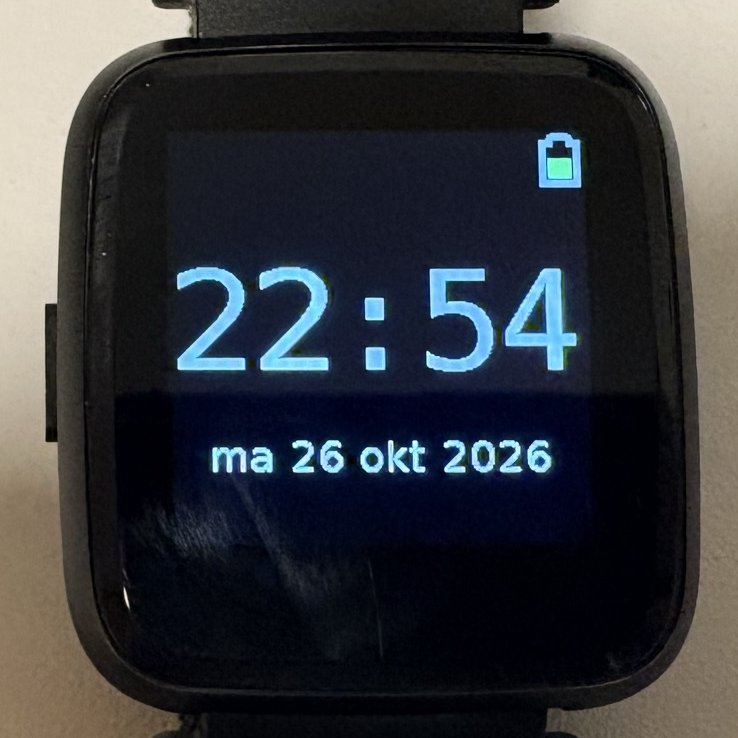
Of course I wanted my own watch faces. The first one is simple: the existing week clock, but in Dutch, because I’m Dutch. Dutch abbreviates weekdays with two letters, so it says ma 26 okt 2026. Remember that the memory on this watch is tiny, so there’s no room for a full multilingual OS. But you can just translate a watch face, build it, and put your localized version on the watch. You’ll see a picture of it on top of this post.
The second one is more fun: an 8-bit style clock. The digits come from a tiny 6×7 pixel font, and every font pixel is drawn as a block of 7×7 screen pixels for the time and 3×3 for the rest. That gives the retro look, and it needs no font data at all. Below the time and the ISO 8601 date (YYYY-MM-DD, obviously), it shows the Unix epoch, counting every second.

The Guido app
And then, as a finishing touch and to emphasize the Python angle, I created the Guido app. It shows a blocky portrait of Guido van Rossum, the creator of Python. Swipe, and you get the Python logo, then the MicroPython logo, and then the logo of our own Python Leiden meetup. One more swipe and you’re back at the clock.

The portrait is 80×80 pixels in 16 colors, drawn three times larger. That fills the 240×240 screen and gives it a nice retro look. The logos are drawn sharp, at full resolution.
Flash is tight on this watch. The firmware has about 330 KB to work with, and a single full-screen picture as raw pixels takes 112 KB, a third of that. So I made a small image format of up to 16 colors per picture plus run-length encoding, with a decoder of about 40 lines that draws them straight to the display. All four pictures together now take under 12 KB. Still, that’s too much for something this silly to include by default, so the app is optional: you have to add it to your build yourself.
The original photo is by Kushal Das, taken at PyCon US 2024 and licensed CC BY-SA 4.0, so the blocky version is shared under the same license.
.jpg)
Coming up: the PineTime Pro
Pine64 is working on a successor: the PineTime Pro. It gets a 410×502 AMOLED screen, GPS, a dual-core Cortex-M33 and a digital crown. It’s still early, there’s no release date yet, and the original PineTime keeps being made. But that would be a much bigger playground for MicroPython. Guido in AMOLED!
Try it
Everything is in the
pinetime-upstream-micropython
branch of my wasp-os fork.