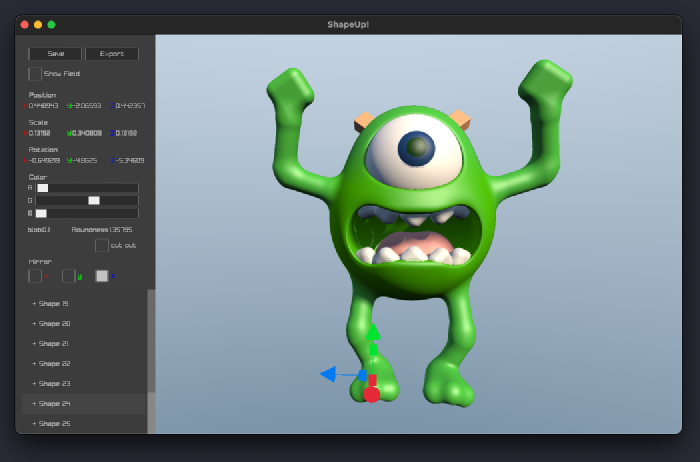
Last fall I participated in a week long programming event called the Wheel Reinvention Jam. The point of the Jam was to revisit existing software systems with fresh eyes. I ended up making a 3D modeler called “ShapeUp”. This post will make more sense if you watch the video demo of ShapeUp before reading more. You can try ShapeUp in your browser.
This is what it looks like:

Mike Wazowski modeled in ShapeUp
A 3D Modeler
I hate how slow the typescript compiler is (this connects, trust me). The jam seemed like a good opportunity to implement a faster subset of Typescript to beat tsc. Starting with the esbuild or Bun typescript parser made the project seem plausible. It dawned on me that success would look like one terminal command finishing faster than another. As far as demos go, not super compelling. I wanted a cool demo. So I pivoted to 3D.
The only reason a 3D project from scratch in a week seemed doable was because of a technique called ray marched signed distance fields (SDFs). A ray marched SDF scene with colors, soft shadows, and ambient occlusion can be implemented much faster than an equivalent triangle based renderer. The amazing Inigo Quilez uses SDFs to create pixar-like characters in one sitting. I had written SDF shaders before but they were rudimentary. Modeling by editing code felt unnatural to me. I wanted to edit the shapes with a mouse. This jam seemed like my chance to make that a reality.
 ShapeUp’s Signed Distance Field visualized
In C
I wrote ShapeUp in C, and used raylib to create the OpenGL window. Raylib turned out to be one of those libraries that gets you going quickly, but slows you down in the long run. More about that later.
Some view C as a language so simple and raw that you’ll spend all your time working around the language’s lack of built in data structures, and fixing pointer bugs. The truth is that C’s simplicity is a strength. It compiles quickly. Its syntax doesn’t hide complex operations. It’s simple enough that I don’t have to constantly look things up. And I can easily compile it to both native and web assembly. While C has its share of quirks, I avoid them by habits developed over 22 years of use.
My “day job” project is 177,000 lines of C and Objective-C. By comparison, ShapeUp’s small single C file is trivial. Even so, I think it’s interesting to look at how it uses data. Models are made up of Shapes:
| |
The Shapes are kept in a statically allocated array:
| |
Can’t fail to allocate, can’t be leaked, no fluff. Lovely. The 100 shape limit wasn’t limiting in practice. With very little time to optimize the renderer, the framerate would drop before you even got to 100 shapes. If there had been time, I would have broken the model into little bricks and then raymarched within each brick.
For dynamic memory, ShapeUp calls malloc in only 3 places:
- Saving (allocates a buffer big enough to hold the whole document)
- .OBJ export (again, allocates a buffer large enough to hold all vertices)
- GLSL shader generation (buffer for shader source)
In all cases there is a single free at the end of the function. Again, this is all trivial - I mention it mostly as an existence proof that memory in C can be trivial. You could certainly make it harder on yourself by malloc-ing each Shape individually and storing those pointers in a dynamic array. Using a language like Java, Javascript, or Python would force that allocation structure. I appreciate that C gives me control over memory layout.
The UI is implemented as an immediate mode user interface (IMGUI). I love this approach to UI. It’s very easy to debug and you use a real programming language to position elements (unlike CSS, constraints, or SwiftUI). Like most IMGUIs, I used an enum to keep track of what element had focus, or what action the mouse was making:
| |
This project didn’t need dynamic arrays or hashmaps, but if it had, I would’ve used something like stb_ds.h.
Aside: Wrestling Raylib
So while I feel good about deciding to use C, raylib turned out to be trouble. First off, it has strange design choices that harm the developer experience:
Raylib uses
inteverywhere that you would expect an enum type. This prevents the compiler from type checking and the functions don’t self document. Take this line in raylib’s header for example:1 2// Check if a gesture have been detected RLAPI bool IsGestureDetected(unsigned int gesture);It looks like
gesturemight be an ID for a gesture you’ve registered for. Reading the raylib source reveals thatgestureparameter is actually aGestureenum! This happens everywhere. Raylib’s only documentation is the header file, so you have to go to the implementation to see if anyintparameter is really an enum, and if it is, which enum.Raylib doesn’t do basic parameter validation, by design. This function segfaults when dataSize is null:
1unsigned char *LoadFileData(const char *fileName, int *dataSize);The raylib header doesn’t indicate that dataSize is an out parameter, or that it must not be null. This no-validation choice affects many functions and made trivial problems hard to track down. If you’re lucky it segfaults somewhere useful (but it doesn’t log an error). If you’re unlucky it just silently does something weird.
Raylib doesn’t take responsibility for its dependencies. There are issues in GLFW that raylib won’t work around or submit a patch for. As an end user of raylib, the method they chose to create a window is an invisible implementation detail. I care about raylib’s features working for me, regardless of what that means internally.
The raygui UI library is just a toy:
- can’t display floating point numbers. I had to make a float text field.
- doesn’t handle mouse event routing for overlapping or clipped elements
- can’t do rounded corners, which are everywhere in UIs.
- can’t be styled to look good
And finally just plain bugs:
- raygui tooling had a bug that prevented changing the font from the hyper-stylized default (please pick a reasonable default!)
- Drawing functions like
DrawCircle(...)don’t share vertices between triangles. That causes pixel gaps due to floating point error when the current matrix has scaling or rotation.
For a while I reported issues as I found them, but almost all of them them were closed as “wont fix”. This was frustrating and discouraging, and it was time consuming to write the bug reports, so I just stopped.
So yeah, while it was great that raylib made me an OpenGL window, I paid dearly for that convenience. Luckily I usually found an escape hatch: either by using OpenGL functions directly, or implementing a feature from scratch. In the future I’ll go with sokol.
In a Week
At a high level, ShapeUp came down to 4 main parts that needed to be completed in 6 days:
- The user interface (3D gizmos, keyboard shortcuts, sidebar, game controller)
- GLSL shader generator + Ray marching renderer (explained in video)
- GPU-based mouse selection (explained in video)
- Marching cubes for export (explained in video)
Each one individually was not hard. The hard thing was prioritizing correctly and not getting sidetracked. It helped to solve finicky or time consuming problems by designing around them, or by using a dumb solution that works in 90% of cases. Sometimes punting a feature by a day gave my subconscious time to find a solution.
I tried to work in such a way that I always had a working 3D modeler, and progressively improved it as time allowed. I think about it like building a pyramid. If you build layer by layer, you don’t have a pyramid until the very end. On the other hand you can build it so that stopping at any step is a complete pyramid.

Closing
By the end of the week I had a 3D program that could make meaningful 3D models and export them to an .obj file. It also runs on multiple platforms and has file open/save.
 A Wrench Modeled in ShapeUp
The project is 2024 lines of C and 250 lines GLSL. Kind of surprising that a somewhat useful 3D modeler can be expressed in ~2300 lines.
Other jam participants seemed impressed by ShapeUp but I don’t feel like I achieved much. It’s a relatively simple project. If there is anything special about what I did, it is that I had the taste to choose what to make, the knowledge to make it, and the discipline to do it in a week.
You can try ShapeUp in your browser, just keep in mind it was made in a week :)
The source code is avalible on github
Discuss on Twitter
Discuss on Lobste.rs
Discuss on Hacker News