Every year someone says that this is the year of the Linux desktop.
It is never the year of the Linux desktop.
There are many reasons for this. Drivers. Games. Adobe. Microsoft Office. Battery life. The thing where you close the lid of a laptop and open it again later to find that it passed into the good night. These explanations are all correct in the small and unsatisfying in the large. They explain why a person did not switch to Linux last Thursday. They do not explain why the desktop, as an institution, will continue to belong to Apple and Microsoft.
And now there is a new and more depressing explanation.
The future computer user is not a person.
Or at least not only a person. The robots are coming for the desktop. The interesting part is that the ramps were already there.
They were called accessibility APIs.
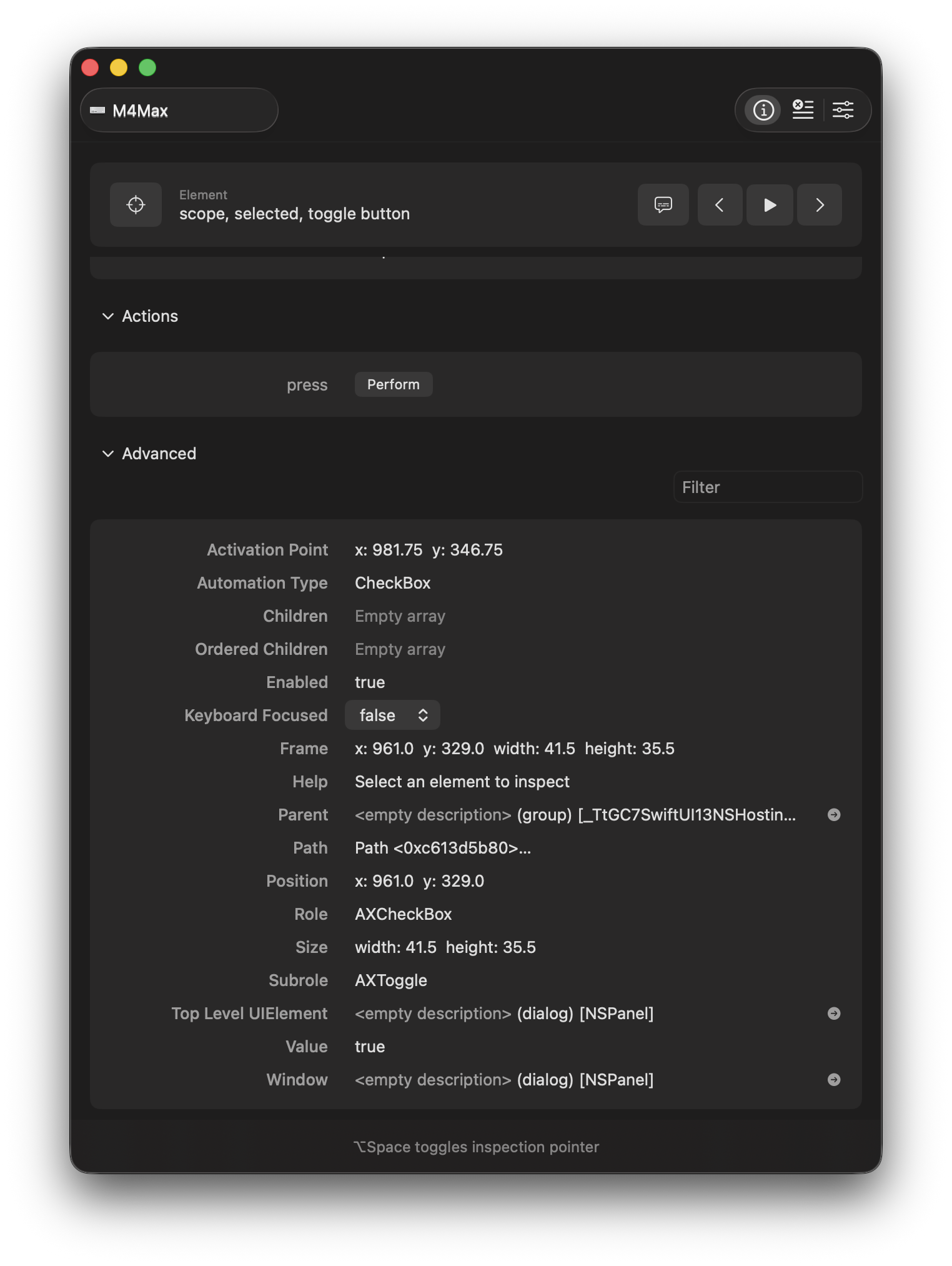
If you use a Mac and open the Accessibility Inspector tool that’s built into the system (you really should try it), you can see a second version of the computer, hiding inside the first one. The first version is the one you look at: windows, shadows, rounded rectangles, a little bouncing icon in the Dock from Slack announcing that you are falling behind.
The second version is a tree. A literal hierarchy of objects. Window. Group. Button. Text field. Scroll area. Static text. Each object has properties. Some have values. Some have actions. Some will tell you where they are. Some will tell you what they contain. Some will let you press them without moving the mouse at all.

This is not how computers were initially designed to be used, if by “used” you mean “used by sighted people moving a pointer around.” It is how computers had to be exposed to people who could not rely on pixels. VoiceOver needed it. Switch control needed it. Dictation systems needed it. The operating system had to learn to describe itself.
And now the agents need it too.
You can see this most clearly in OpenAI’s Codex Computer Use feature, which on macOS doesn’t just take a screenshot. It also pulls “available text” out of the frontmost window including text the app makes available outside the visible scroll area, which is to say, content that is technically not on the screen at all. It also allows the agent to interact with your entire Mac without interrupting your usage as it has its own independent mouse that can work in the background.
OpenAI bought the company that built this in October 2025: a twelve-person shop called Software Applications Incorporated, whose product, Sky, had never been publicly released. Sam Altman had personally invested in the seed round. The founders had previously sold Workflow to Apple, where it became Shortcuts. What OpenAI got for an undisclosed but evidently real amount of money was the team’s bet about the right way for an AI model to drive a Mac. The bet appears to have been correct. The binary that runs this inside Codex today is still named SkyComputerUseClient.
This is the part where you might expect me to say that the reason macOS is suddenly so good for agents is the accessibility API. But that’s not really the full story. Windows has accessibility APIs. Linux has accessibility APIs. APIs are easy to have. You write them down in a header file, give a conference talk about them, and then spend the next twenty years explaining why nobody used them correctly.
The reason macOS is so far ahead is because of defaults.
Apple did not, when most of this was being soldered into place in the late 1990s, anticipate that a stochastic parrot with an $800+ billion valuation would one day need to change a setting in Finder. Apple just decided that if you build a normal Mac app out of normal Mac controls with things like NSButton, NSTextField, WKWebView, the boring stock pieces then your app should be accessible by default. The developer didn’t have to do anything. They wrote a regular app and got a high-fidelity accessibility tree for free, because Apple put the cost of compliance into the SDK instead of the application. The blind user got the tree. The accidental beneficiary, all these years later, is Codex.
This is one of those situations where a moral concern turns out, in retrospect, to have also been infrastructure.
For most of software history, accessibility was treated by most engineering teams as either a compliance chore, an act of kindness, or a thing you would get to at the end if there was time, which there never was, because the only features that were ever truly protected were the ones that affected someone’s bonus.
This was always wrong! But it is now wrong in a way that rich people can understand. A bad accessibility tree no longer excludes only disabled users. It also excludes agents. Accessibility is, by accident, becoming agent compatibility.
Agents are now new customers. History is not sentimental about motives. The accessibility tree was built for assistive technology, and now the robots in the machine wants to use it to book a flight.
And in this area, the Mac is truly far ahead.
Windows, in its defense, has a very serious accessibility tree. Microsoft UI Automation (UIA) is, in some ways, the most Microsoft thing imaginable.
It is a complete object model of the desktop with three filtered views: raw, control, and content. Because of course Microsoft looked at the question of “what is on screen” and decided one ontology would not suffice. It has a real pattern system: InvokePattern for buttons, TextPattern for documents, ValuePattern for inputs, and an enumeration of verbs that controls admit to supporting.
Microsoft’s own documentation cheerfully observes that this same API can be used by assistive technologies and by automated test scripts, which has turned out to be the most prescient sentence Microsoft has written about Windows in many years.
UI Automation is, by any reasonable engineering standard, excellent.
The problem with Windows is not the API. The problem is archaeology. Every Windows machine is a museum of electricity. There’s not one type of app. There is Win32. There is WPF. There is WinForms. There is UWP. There is WinUI. There is Electron. There is some custom line-of-business application written by a contractor in 2009 who has since moved to a farm and cannot be reached. There is a settings panel that is secretly a web page. There is a desktop app that is secretly Chromium wearing a fake mustache. The list goes on.
UIA can be very good. But the app has to meet it halfway. And on Windows the app frequently does not meet it halfway. It’s nearly unusable. A UIA tree scanned across a real Windows desktop is full of regions that respond, with admirable consistency, the way an empty house responds to a knock.
The recurring theme here is that an agent does not just need an API. It needs a civilization of apps that conform to the API well enough that the agent can trust what they say. A button that admits to being a button. A text field that admits to containing text. A table that does not expose itself as fourteen hundred unnamed rectangles and a prayer.
Which brings us to the mess of Linux.
To be fair, and one should be fair about this, because Linux folks can smell imprecision through concrete, Linux does have an accessibility stack! It is called AT-SPI , the Assistive Technology Service Provider Interface, and it is real. It runs over D-Bus. It exposes Accessible, Action, Component, Document, Text, Value, and so on. GTK apps support it. Qt apps support it. Firefox supports it. LibreOffice supports it. Orca, the GNOME screen reader, has been in production on it since 2006.
But agents do not just need an accessibility tree. They need to enumerate windows. They need to capture the screen. They need to synthesize input. They need a coherent permission model. They need to do all of this without the user feeling like they are watching a haunted mouse perform community theater.
On a Mac, this is one Accessibility toggle and one Screen Recording toggle, both clearly named, both stored in the same general place. On Linux under Wayland, the screen capture is a portal, the input synthesis is a different portal or libei, the window enumeration is a per-compositor protocol, and the cross-compositor accessibility evolution, called Newton, is a prototype being developed by a man named Matt Campbell on a grant from the Sovereign Tech Fund. A GNOME Foundation report from April 2025 describes the protocol as “not yet rigorously defined” and notes it “has not yet seen any cross-desktop discussions.” KDE has not committed to it.
Every step of the loop is available, after installing the correct backend and selecting the correct session type and, depending on the day, sacrificing a small goat to the compositor. Apple can force attention. Microsoft can institutionalize it. Linux has to convene it.
The problem is that Linux can make almost anything exist, but it cannot make almost everyone agree to care about it at the same time. This is the part that has kept the year-of-the-Linux-desktop joke alive long after Linux became, on most days, a perfectly usable desktop. StatCounter has it at 2.99% of global desktop usage in April 2026, up from 2.76% in 2022. Continents move faster. But you can put Ubuntu on a ThinkPad and do most of what a normal person needs to do, and people do. The desktop got pretty good.
The mission, by its original definition, is mostly accomplished.
Nobody is throwing a party because the target is about to move.
The target is moving because the standard for “usable desktop” is no longer whether you would enjoy using it. The standard is whether a thing that is not you can use it on your behalf.
The high-fidelity accessibility tree, the reliable input synthesis, the standardized window enumeration, the portable screen capture, the coherent permission model. Apple has been building exactly this for thirty years, paid for by Cupertino, almost entirely for the benefit of users who number in the low millions. The work is now, accidentally and irreversibly, also the substrate for agents, which are about to number in the billions.
Microsoft has been engineering most of it but letting half the platform skip the homework. The Linux community has been building parts of it, in scattered repositories, by ones and twos, often on grants, often by one guy in Nebraska.
This is not the kind of gap a community closes by writing better software. It is the kind of gap that takes a decade of full-time employees auditing every label in every default app, a market mechanism that punishes you when you don’t, and a centralized review process to enforce it from above.
None of that exists for Linux. None of it is coming.