As I mentioned in my post earlier this week, we just completed a migration from WordPress to Jekyll. I outlined a couple of reasons for it but basically came down to preference, speed, and ability to make changes easily.
Frameworks like Jekyll (or Astro) aren’t for everybody, although they make a lot more sense in the general environment of AI proliferation, markdown becoming the lingua franca of LLMs, and a general trend toward headless sites. Everybody knows how insecure WordPress can be, although this is largely mitigated by working with a reputable host.
The biggest issue was speed. As a platform company, we move very fast and we always felt limited by what we could do with WordPress and we were constantly bottlenecked by whether or not we had WP developers available. But it’s hard to find good developers for any framework and especially for WordPress. When you find someone who is good at WordPress development, it means they are good at pretty much everything else they try and so it feels like a waste of talent to have them work on WordPress. It’s like a built-in brain drain.
Since the advent of coding agents like Claude Code, it has now become easier to completely route around this problem by simply migrating to another platform. We chose Jekyll for the reasons I’ll discuss in the next section.
Architecture decisions that led to Jekyll
Just last week, Cloudflare announced a new CMS framework that they have dubbed the “spiritual successor” to WordPress. It’s based on Astro, which is one of the most popular static site generators (SSG) right now. It looks great, but we wanted something that we had experience with and was a mature framework. As I mentioned in my previous post, our site ran on Jekyll long ago so we knew it well.
For those who are not familiar: the biggest difference between a CMS like WordPress and an SSG is that there is no database (typically), nor even an application server in the latter. You’re working entirely in HTML templates, includes, layout files, config files, and then markdown for everything else.
Metadata on the page is defined as frontmatter, which is the YAML data between the --- delimiters at the top of the markdown file.
So, for example, the frontmatter for this post looks like this:
layout: post
title: "Moving from WordPress to Jekyll (and static site generators in general)"
description: "Some technical notes on how and why we moved from WordPress to Jekyll, a well-known static site generator (SSG)."
date: 2026-04-09
author: Ray Grieselhuber
permalink: /blog/rebuilding-demandsphere-with-jekyll-and-claude-code/
tags:
  - Engineering
  - AI Search
Other than that, these posts are just straight markdown. We start them in the _drafts folder and move them to the _posts folder when we’re ready to publish.
Migrating 288 WordPress blog posts and other pages
The area that took the most time, aside from the design, was properly migrating the existing content. The site itself has over 15 years of blog posts but, frankly, we didn’t need all of them.
So, we used our GSC tools in DemandSphere to identify the pages that actually had valuable equity and used indexing data to make the call on which pages could be left unindexed - and simply deleted - as part of the migration.
WordPress has an XML export that you can use to export everything, so we started with that. Fortunately, I was able to leverage Claude Code quite a bit to analyze each page in terms of the equity it had and very quickly filter out what we didn’t need.
It took a little more fiddling to get featured images (and images in general) migrated over properly but this was also basically an export and an import.
AI-assisted development with Claude Code
Claude Code was basically what enabled us to do what we had wanted to do for years. Everyone on our team is so busy that we never would have had time to do a proper job of this migration. It didn’t make sense to hire out the work either.
We heavily leveraged multiple sessions, CLAUDE.md, and a bunch of other .md files to keep the project on track.
The part where Claude Code really helped the most was in building nine separate dev tools that live right in the repository. We were able to leverage custom build scripts that keep these dev tools outside of the production build as well.
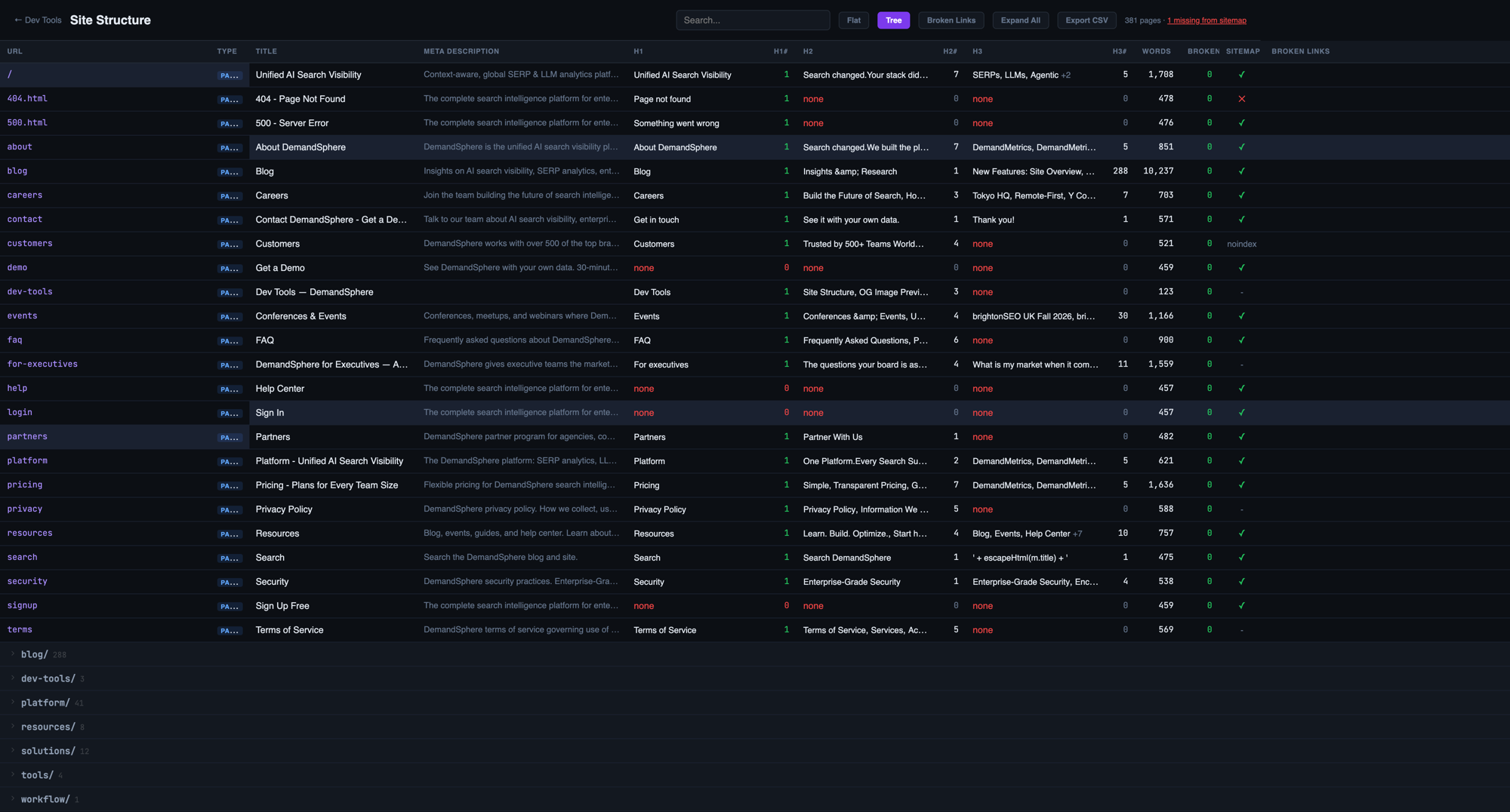
The featured image of this post shows what the Dev Tools dashboard looks like.
Most of these tools are managed by individual audit scripts dedicated to producing the output needed. So, for example, we have a lighthouse.js script, a site structure script, and so on.
We built the following:
Site Structure
This was initially one of the most helpful tools, because it served as a tiny, onboard Screaming Frog type tool. We could easily spot URLs that weren’t on the sitemap, missing / duplicate metadata, etc.
It also helped us spot URLs that belonged under different subfolders.

Lighthouse Auditor
As any SEO worth their salt will tell you, Lighthouse is about a lot more than just page speed and website performance. We made a lot of improvements and still have more to go.
The fact that the site, in production, is all static obviously helps.

Schema Auditor
This is one that we will be doing more work on but it was a great tool to help us make sure we had a baseline of schema data in place.

AEO Auditor
The AEO auditor tool is far from comprehensive but helped us cover a lot of the basics.

Schema Details
The Schema Details tool helped us to analyze, page by page, what we needed to improve in terms of coverage.

Open Graph Preview
The Open Graph preview tool I use a lot, because this one lets us preview how a page will look when shared on socials.

Within the tool, you can click on each page and it will pop up a viewer that shows how it will look in Facebook, LinkedIn, X, and Slack.
I can see that I already have a page to fix after finishing this post.
Content Similarity - Topic Clusters
After the migration was complete, I added this one because I wanted to get an understanding of the semantic clustering of the site.

We vectorized the entire site using the all-MiniLM-L6-v2 model, a nice, 384-dimensional embeddings model that runs completely locally, from @xenova/transformers.
It was more than sufficient for this first run.
Content Similarity - Topic Table
The embeddings also enabled the creation of a few more subtools.
First up was a topic table. This one still needs some more work and adjustment of the parameters but it gave us a decent overview of the major topics covered.

Content Similarity - Similar Pairs
We also generated a content similarity report, so we can go back and either combine / merge content that is overly similar or spend time on each one to make it more differentiated, if that makes sense to do.

Content Similarity - Semantic Cores
The semantic core concept is one of the key things to understand about any site, in my opinion, because it’s related to how the LLMs and search engines understand, at a general level, what your site is about.

Internal Linking
Internal link auditing, when you have the embeddings of a site, is one of the best processes you can run in order to help the engines understand which topics and pages are most related.
I never liked the tools that were available for WordPress for this, so we’re happy to have this now.
We do have a lot of optimization to do here, however.

Redirects
The Redirects tool was invaluable in making sure that we didn’t miss anything important.

As we can easily see in each one of these, our job is far from over in putting the finishing touches on the site but we’re in a much better place to fix remaining issues and know exactly what to focus on.
Client-side search with no external dependencies
Jekyll generates a /search.json file at build time. It’s a JSON array of every page and post with title, URL, content (up to 400 characters), tags, date, and type indexed in the file. The search page fetches a single JSON file, runs substring matching in the browser. It scores each element of the metadata (e.g., title 10x, tags 5x, etc) with weights, and caps the results returned at 30.
This allowed us to have full site indexing and search capability with no Algolia, no Elastic, no Lunr.js, no server API.

The current stats are 398 entries and this will easily scale to 2,500-3,000 pages before we need to make any optimizations. We estimate that search latency will still stay sub-3ms even at 5,000 pages, so we’re good for a long time.
SEO architecture
We wanted structured data on every page from day one.
Every page on the site has JSON-LD schema - Organization and WebSite on all pages, BreadcrumbList on everything except the homepage, FAQPage on any page with FAQ content, BlogPosting on blog posts, and SoftwareApplication on product pages.
The FAQ schema is generated automatically from front matter. We add a faq_schema block to the YAML and the template handles the rest. No manual JSON-LD editing is necessary. This is how we got to 470+ FAQ entries across 128 pages without spending too much time.
Canonical tags, Open Graph meta, and the RSS feed all use site.url so they resolve correctly per environment.
The robots.txt is environment-aware too - staging blocks all bots except Screaming Frog and Sitebulb, production allows everything.
GTM and Google Analytics only load after the user accepts the cookie consent banner. On staging, the consent banner doesn’t even render. This keeps our analytics clean and our staging environment invisible to tracking.
The sitemap is handled by the jekyll-sitemap plugin, which just generates it from the build output. No manual maintenance.
One thing I didn’t expect to spend time on was Content Security Policy headers.
Every time we deployed, something new would break: first Cloudflare’s own analytics beacon was blocked, then Google Ads conversion tracking, then the Leaflet map library on our international SEO page.
We went through about six rounds of CSP updates before everything was clean.
Production cutover
We run two environments on Cloudflare Pages from the same repo.
The main branch is production, and any other branch deploys as a preview.
The build.sh script checks the CF_PAGES_BRANCH environment variable and sets JEKYLL_ENV accordingly. Production builds remove the dev-tools directory and keep the sitemap. Staging builds remove the sitemap and add noindex headers.
The DNS cutover was straightforward because we already managed our DNS in Cloudflare.
Adding www.demandsphere.com as a custom domain on the Pages project automatically swapped the CNAME from Kinsta to Pages.
After the cutover, we ran a Screaming Frog crawl and found a few issues to fix.
We also found that our favicon wasn’t showing up in Google’s search results.
Two problems: the root /favicon.ico was returning a 404 because we hadn’t copied it to the root directory, and our PNG favicon was only 32x32 pixels. Google requires at least 48x48. We added a 96x96 PNG, a 48x48 PNG, a web manifest, and a proper multi-size ICO at the root.
Google’s favicon cache is slow to update, but the technical setup is now correct.
What’s next
There’s still a lot to do.
We have about 65 images over 100KB that need optimization. Most of our 288 migrated blog posts only have a generic “Blog” tag and could use proper categorization.
It’s working well overall, and we’re very happy with the migration. We can now execute on new content ideas far faster and at much higher quality than we have ever been able to do so before.