RAG is great, until it isn't.
Our assistant could only retrieve chunks of text that matched a query. If the answer lived across multiple pages, or the user needed exact syntax that didn't land in a top-K result, it was stuck. We wanted it to explore docs the way you'd explore a codebase.
Agents are converging on filesystems as their primary interface because grep, cat, ls, and find are all an agent needs. If each doc page is a file and each section is a directory, the agent can search for exact strings, read full pages, and traverse the structure on its own. We just needed a filesystem that mirrored the live docs site.
The obvious way to do this is to just give the agent a real filesystem. Most harnesses solve this by spinning up an isolated sandbox and cloning the repo. We already use sandboxes for asynchronous background agents where latency is an afterthought, but for a frontend assistant where a user is staring at a loading spinner, the approach falls apart. Our p90 session creation time (including GitHub clone and other setup) was ~46 seconds.
Beyond latency, dedicated micro-VMs for reading static documentation introduced a serious infrastructure bill:
SandboxChromaFs
At 850,000 conversations a month, even a minimal setup (1 vCPU, 2 GiB RAM, 5-minute session lifetime) would put us north of $70,000 a year based on Daytona's per-second sandbox pricing ($0.0504/h per vCPU, $0.0162/h per GiB RAM). Longer session times double that. (This is based on a purely naive approach, a true production workflow would probably have warm pools and container sharing, but the point still stands)
We needed the filesystem workflow to be instant and cheap, which meant rethinking the filesystem itself.
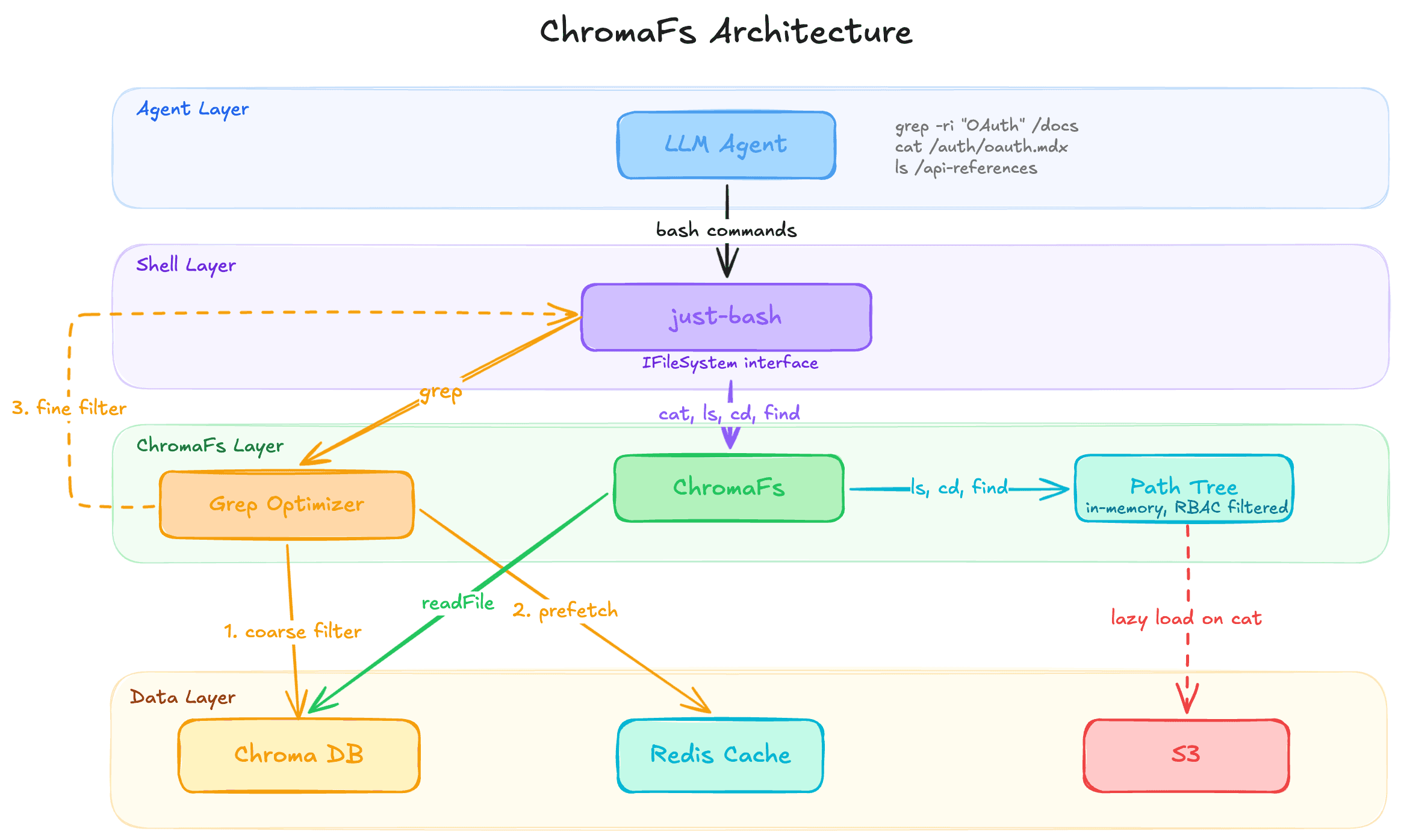
The agent doesn't need a real filesystem; it just needs the illusion of one. Our documentation was already indexed, chunked, and stored in a Chroma database to power our search, so we built ChromaFs: a virtual filesystem that intercepts UNIX commands and translates them into queries against that same database. Session creation dropped from ~46 seconds to ~100 milliseconds, and since ChromaFs reuses infrastructure we already pay for, the marginal per-conversation compute cost is zero.

| Metric | Sandbox | ChromaFs |
|---|---|---|
| P90 Boot Time | ~46 seconds | ~100 milliseconds |
| Marginal Compute Cost | ~$0.0137 per conversation | ~$0 (reuses existing DB) |
| Search Mechanism | Linear disk scan (Syscalls) | DB Metadata Query |
| Infrastructure | Daytona or similar providers | Provisioned DB |
ChromaFs is built on just-bash by Vercel Labs (shoutout Malte!), a TypeScript reimplementation of bash that supports grep, cat, ls, find, and cd. just-bash exposes a pluggable IFileSystem interface, so it handles all the parsing, piping, and flag logic while ChromaFs translates every underlying filesystem call into a Chroma query.
How it works
Bootstrapping the Directory Tree
ChromaFs needs to know what files exist before the agent runs a single command. We store the entire file tree as a gzipped JSON document (__path_tree__) inside the Chroma collection:
{
  "auth/oauth": { "isPublic": true, "groups": [] },
  "auth/api-keys": { "isPublic": true, "groups": [] },
  "internal/billing": { "isPublic": false, "groups": ["admin", "billing"] },
  "api-reference/endpoints/users": { "isPublic": true, "groups": [] }
}
On init, the server fetches and decompresses this document into two in-memory structures: a Set<string> of file paths and a Map<string, string[]> mapping directories to children.
Once built, ls, cd, and find resolve in local memory with no network calls. The tree is cached, so subsequent sessions for the same site skip the Chroma fetch entirely.
Access Control
Notice the isPublic and groups fields in the path tree. Before building the file tree, ChromaFs prunes slugs using the current user's session token and applies a matching filter to all subsequent Chroma queries. If a user lacks access to a file, that file is excluded from the tree entirely, so the agent can't access or even reference a path that was pruned.
In a real sandbox, this level of per-user access control would require managing Linux user groups, chmod permissions, or maintaining isolated container images per customer tier. In ChromaFs it's a few lines of filtering before buildFileTree runs.
Groups: none
| Path | Access | Visible |
|---|---|---|
| /auth/oauth.mdx | public | ✓ |
| /auth/api-keys.mdx | public | ✓ |
| /internal/billing.mdx | admin, billing | ✗ |
| /internal/audit-log.mdx | admin | ✗ |
| /api-reference/users.mdx | public | ✓ |
| /api-reference/payments.mdx | billing | ✗ |
Reassembling Pages from Chunks
Pages in Chroma are split into chunks for embedding, so when the agent runs cat /auth/oauth.mdx, ChromaFs fetches all chunks with a matching page slug, sorts by chunk_index, and joins them into the full page. Results are cached so repeated reads during grep workflows never hit the database twice.
Not every file needs to exist in Chroma. We register lazy file pointers that resolve on access for large OpenAPI specs stored in customers' S3 buckets. The agent sees v2.json in ls /api-specs/, but the content only fetches when it runs cat.
Every write operation throws an EROFS (Read-Only File System) error. The agent explores freely but can never mutate documentation, which makes the system stateless with no session cleanup and no risk of one agent corrupting another's view.
cat and ls are straightforward to virtualize, but grep -r would be far too slow if it naively scanned every file over the network. We intercept just-bash’s grep, parse the flags with yargs-parser, and translate them into a Chroma query ($contains for fixed strings, $regex for patterns).
Chroma acts as a coarse filter that identifies which files might contain the hit, and we bulkPrefetch those matching chunks into a Redis cache. From there, we rewrite the grep command to target only the matched files and hand it back to just-bash for fine filter in-memory execution, which means large recursive queries complete in milliseconds.
1. Coarse filter (Chroma)
/auth/oauth.mdx
/auth/api-keys.mdx
/api-reference/users.mdx
/api-reference/payments.mdx
/guides/quickstart.mdx
/guides/webhooks.mdx
3/6 files match
2. Fine filter (in-memory regex)
/auth/oauth.mdx
Use the access_token from the OAuth flow to authenticate API requests.
/api-reference/users.mdx
The GET /users endpoint returns a list of users. Requires access_token in the Authorization header.
/guides/quickstart.mdx
Get started by generating an access_token using the OAuth guide.
ChromaFs powers the documentation assistant for hundreds of thousands of users across 30,000+ conversations a day. By replacing sandboxes with a virtual filesystem over our existing Chroma database, we got instant session creation, zero marginal compute cost, and built-in RBAC without any new infrastructure.
Try it on any Mintlify docs site, or at mintlify.com/docs.