I wanted to switch my home network to IPv6 only design. However the reality is still that there are lot of devices today that only support IPv4 and large parts of Internet are still IPv4 only.
Because of this, many networks still deploy dual stack everywhere. However, I believe there is a case to be made for deploying IPv6 only in your network. Technologies like NAT64, DNS64 and 464XLAT make it possible for IPv6 only networks to access IPv4 services through translation. In this post I explore these technologies and the practical aspects of designing such a IPv6 only home network.
Getting a /48 over dedicated tunnel
My upstream Telus gives me multiple /64s using DHCP-PD. However the issue is that these are dynamic prefixes with a 10 minute lease timer. So if I turn off my router for more than that, there is good chance that the prefix could change. I wanted static prefix for my LAN and I also wanted more prefixes that I could then delegate to other things like Docker and VPN.
So I decided to use Free Range Cloud service provider to lease a /48, which cost me around C$10/year. I also used their tunnel service to then route this over to me. They have a POP in Vancouver, Canada and since I am in Kelowna, this is around 15 ms of latency away. However since most traffic flows through Vancouver anyways, this didn’t add much in terms of latency in reality.
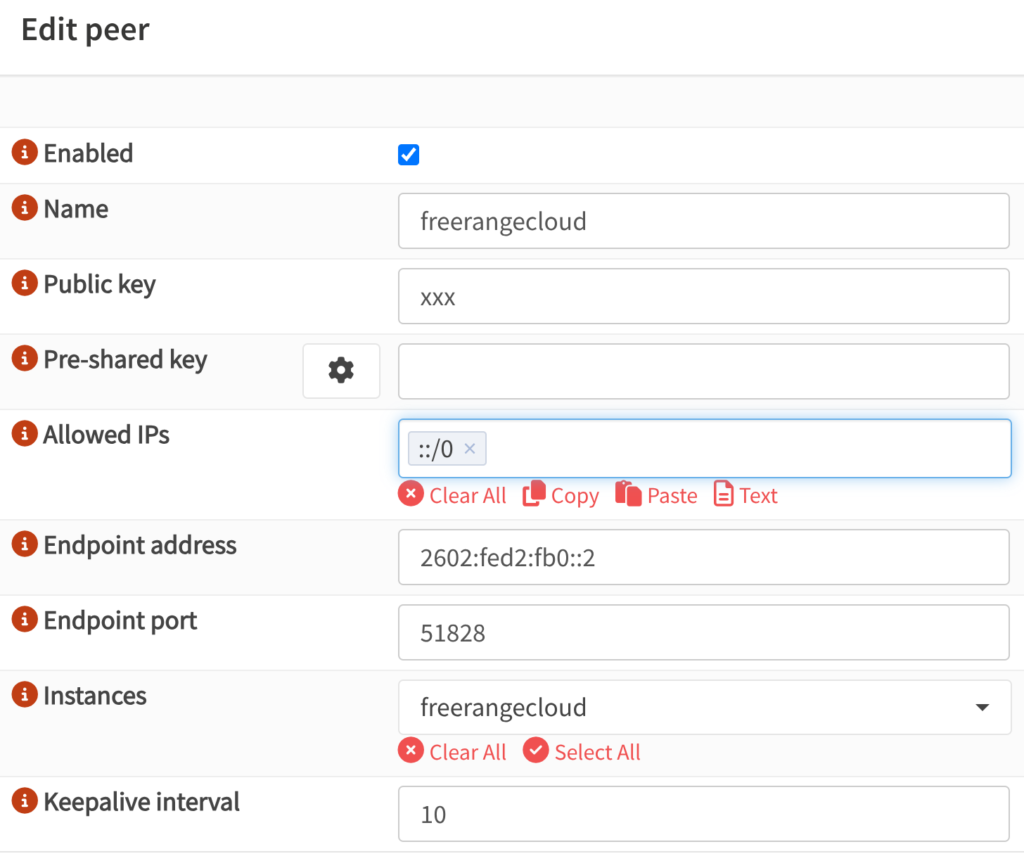
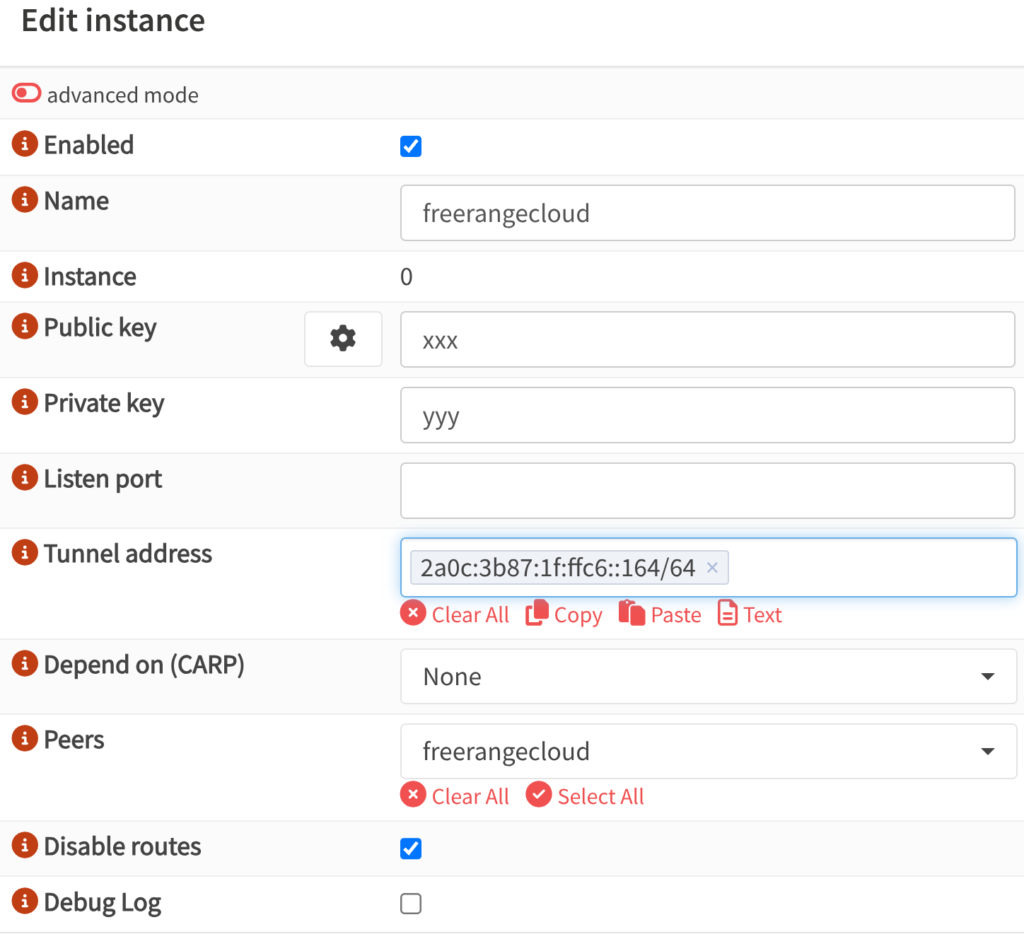
I added the Wireguard details on OPNSense firewall and it started working. I decided to use IPv6 on tunnel and got a IPv6 address from WAN to connect from. This way I am not reliant on IPv4 for connectivity and don’t need to worry about MTU and fragmentation and can just let IPv6 PMTU take care of it.

I then added a simple Policy Based Routing(PBR) rule on LAN interface to send traffic through the tunnel. Since there is no rdns setup, I used All Knowing DNS Server to setup rdns for the IP block. I have talked about how to set this up in this post.
IPv6 Addressing – SLAAC and DHCPv6
I decided to use a /64 out of the /48 for my main /48 subnet for my LAN. I then ran SLAAC(Router Advertisements) in Assisted mode with M+O+A flags set. This way clients can get IPv6 address in a stateless way, but I also ran Kea DHCPv6 server which would hand out addresses in stateful way. Unbound then picked up the static leases and then ensured that DNS resolution worked.
I also used /56 on every Docker host, with /64 for each Docker network that was then advertised to my firewall, but I’ll talk about this setup in later section.
- Main subnet ➡️ 2602:fed2:7e02::/48
- LAN subnet ➡️ 2602:fed2:7e02:69::/64
- Example IP for Docker host on LAN ➡️ 2602:fed2:7e02:69::22
- /56 for Docker host(/64 for each network) ➡️ 2602:fed2:7e02:2200::/56
I also used static addressing for each physical host so that I would not have issues during an outage.
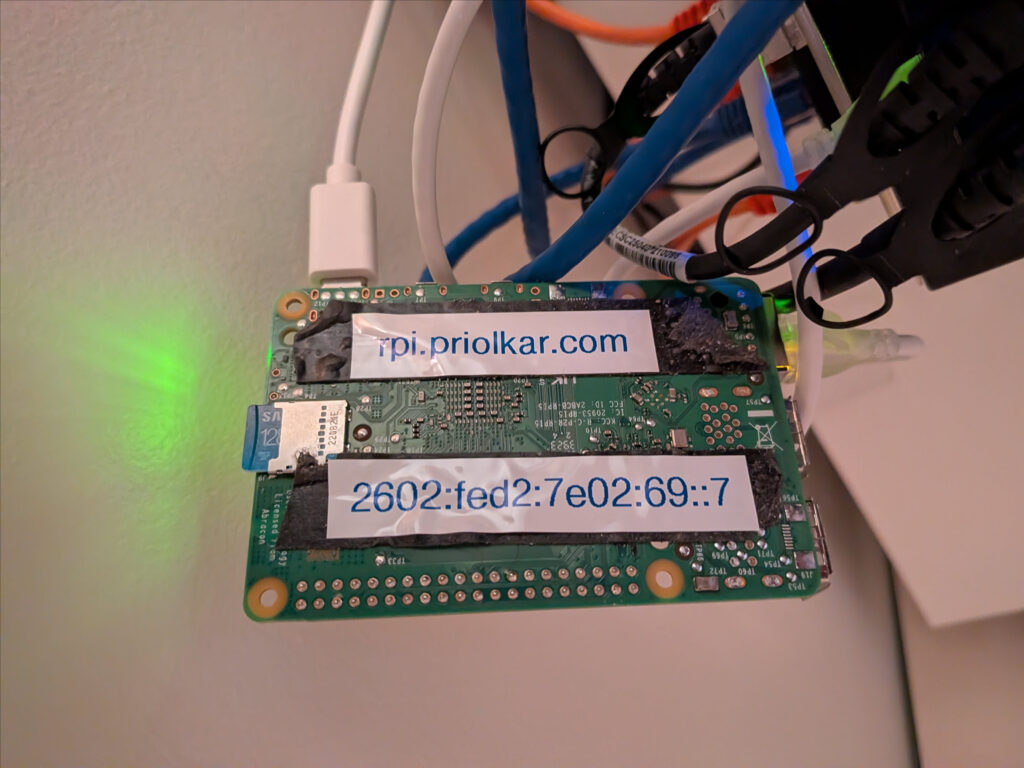
At this stage, I am still running a DHCPv4 server to give private IPv4 address to devices. I moved all my servers to IPv6 only, but my printer, vacuum robot and laptop still gets a IPv4 address using DHCPv4 server. My phone still got an IPv4 address at this stage, but this will change in the later section.
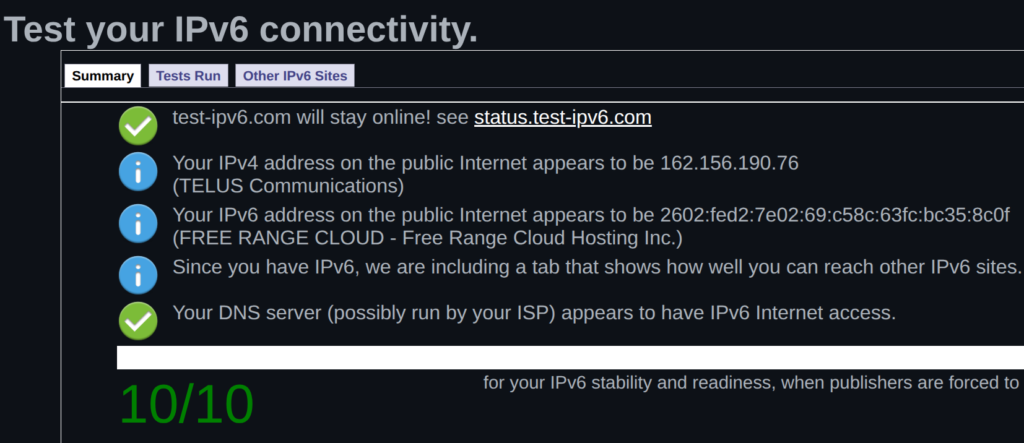
After setting all of this up, going to a IPv6 test website should give an output like this.
Accessing IPv4 Services over IPv6 – DNS64 and NAT64
There is a way to statefully access IPv6 services over IPv4. The process involves allocating a /96 from the IPv6 pool to hold the entire IPv4 address space. Both of these hold 32 bits of address space so can be used for translation. I used the default 64:ff9b::/96 address pool to keep things simple.
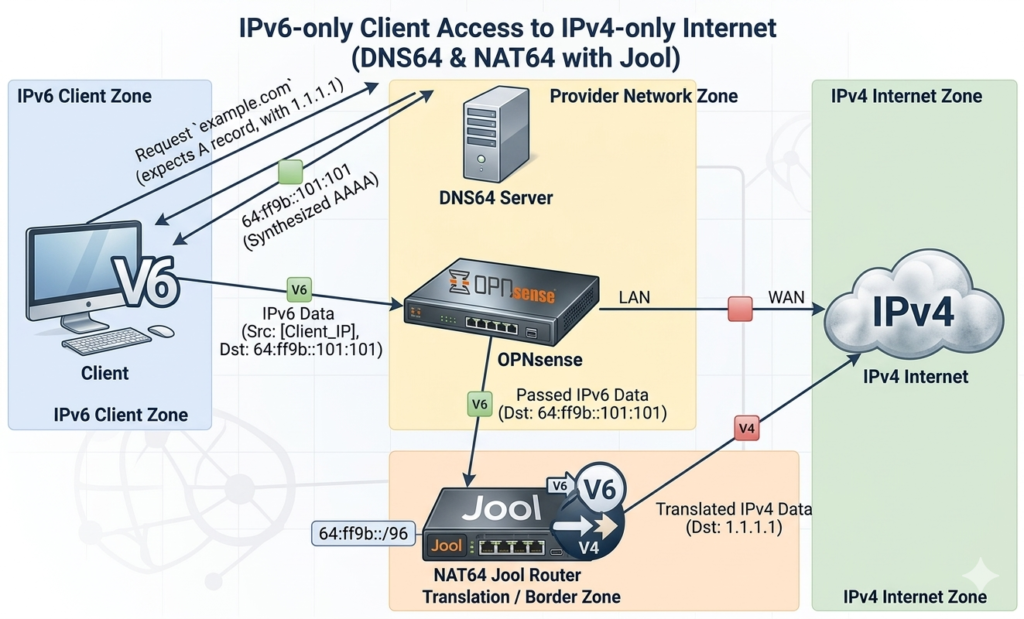
I used a software called Jool on a VM to do the translation. There are other options too like Tayga64, but it works in userspace, unlike Jool that is a kernel module. I passed through an interface bridged to my WAN to this VM so that I could get a public IPv4 address to avoid double NAT. There was also a default route with higher metric to OPNSense as a fallback. You need DNS64 server that can translate DNS records with only A record to AAAA records. Unbound on OPNSense can do this or you can also use NAT64 version of public resolvers. I also changed lowest-ipv6-mtu to 1470 – the value of CLAT interface on Android.
The other thing I had to do was use FRR routing to advertise this prefix to OPNSense. You could get away with static route, but this way I can scale out Jool instances if needed in future.
!
ipv6 route 64:ff9b::/96 Null0
!
router bgp 64420
 bgp router-id 192.168.69.24
 bgp log-neighbor-changes
 no bgp ebgp-requires-policy
 neighbor 2602:fed2:7e02:69::1 remote-as 64420
 neighbor 2602:fed2:7e02:69::1 description OPNSense
 !
 address-family ipv4 unicast
  neighbor 2602:fed2:7e02:69::1 next-hop-self
 exit-address-family
 !
 address-family ipv6 unicast
  network 64:ff9b::/96
  redistribute static
  neighbor 2602:fed2:7e02:69::1 activate
 exit-address-family
exit
!
Once you configure the peer on OPNSense, the route should be visible in the routing table.

I also had to had a firewall rule above the PBR rule we added above to make it use the system routing table. After this, you can visit any IPv4 website and it should be accessible over IPv6. I use the plugin IPvFoo to know what is going on underneath while visiting the website.

Disabling IPv4 – 464XLAT, PREF64 and DHCPv4 Option 108
Once you have NAT64 and DNS64 working, you could just turn off the DHCPv4 server and IPv4 address on the firewall. However, lot of devices like printer, vacuum robot and IPv4 literal addresses would simply not work. This is where DHCPv4 Option 108 comes into the picture. This simply tells the client that IPv6 only mode is preferred. Clients that do not honor this will get a IPv4 address as normal. Those who do have an option can setup 464XLAT to handle IPv4 literals and disable IPv4 addresses.
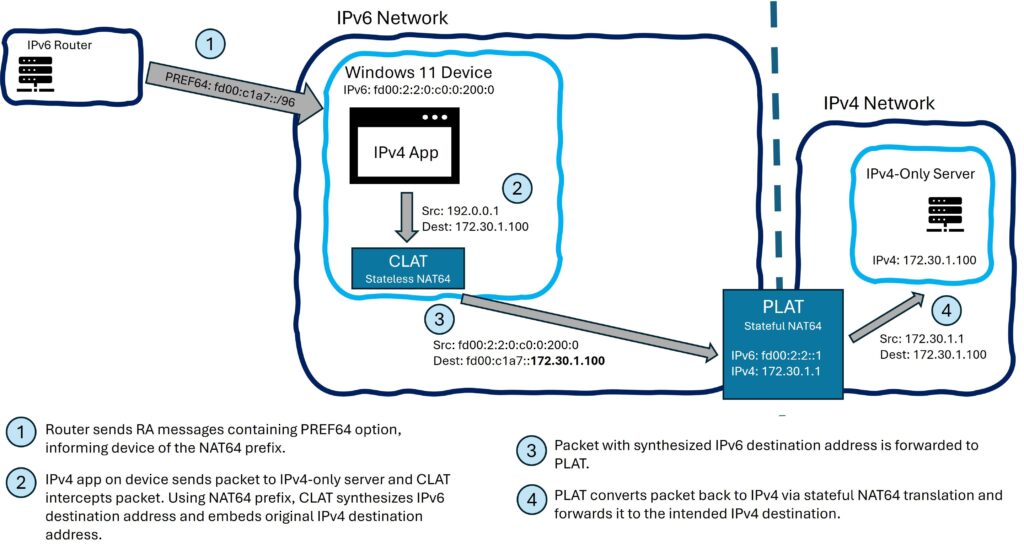
Remember the /96 prefix that we had configured earlier for DNS64? This can be discovered using PREF64 option on SLAAC server. The other way to discover this is by querying ipv4only.arpa domain name. 464XLAT used for handling IPv4 literals has two sides – client side stateless CLAT and stateful NAT64 on server that we setup with Jool above. To summarise, we use the following.
- 464XLAT – Provides private IP interface on end machine for IPv4 literals. Contains CLAT – Stateless NAT64 on host side and PLAT – Stateful NAT64 on Jool.
- DHCPv4 Option 108 – Tells client that IPv6 only network is preferred. Client usually enables CLAT if available and disables IPv4 address from DHCPv4. On Linux, you could not enable CLAT and just disable IPv4 if you want.
- PREF64 – Get the /96 prefix used for DNS64 from Router Advertisement.
- Query ipv4only.arpa – Used as fallback by some clients to find NAT64 /96 prefix if PREF64 is not available.


Support for OS is as follows.
- Android – CLAT enabled with DHCPv4 Option 108. Uses PREF64 as main DNS64 prefix discovery method. Queries ipv4only.arpa as fallback method. DNS64 can be disabled if PREF64 is enabled.
- Linux – CLAT support recently merged in Network Manager – link. Requires DHCPv4 Option 108. Requires PREF64 as DNS64 prefix discovery method. Tested on Ubuntu 26.04: CLAT support hasn’t made it yet, but IPv6 only option works with ipv4.dhcp-ipv6-only-preferred.
- Windows – CLAT not yet enabled, but in preview. Requires DHCPv4 Option 108. Requires PREF64 as DNS64 prefix discovery method. On latest Windows 11, still get IPv4 address.
- Apple – CLAT activated with DHCPv4 Option 108 and PREF64. iOS v16 or above supports ipv4only.arpa as fallback for activating CLAT. DNS64 is required for iOS and Safari. I don’t have Apple devices so not tested.
IPv6 on Docker
IPv6 support on Docker is greatly improved. I am using Docker Compose type setup on most of my servers and wanted to avoid having any IPv4 IP addresses even for internal networking unless really necessary. I also wanted to route my Docker GUA prefixes without NAT66 and not use ULA addresses. I added this in my /etc/docker/daemon.json file.
{
  "ipv6": true,
  "default-address-pools": [
    { "base": "2602:fed2:7e02:2200::/56", "size": 64 }
  ],
  "default-network-opts": {"bridge":{"com.docker.network.enable_ipv6":"true"}},
  "bridge": "none",
  "experimental" : true,
  "ip6tables" : false
}
The DHCPv6 address this server got from the DHCP server was 2602:fed2:7e02:69::22 so I decided to use 2602:fed2:7e02:2200::/56 for Docker networks, with /64 being allocated for each network. After that, you can use prefixes in your Docker compose like this.
services:
  upstream:
...
    networks:
      blocky:

networks:
  blocky:
    driver: bridge
    enable_ipv4: false
    enable_ipv6: true
You can also pick the /64 to use for that particular network and static addresses for each container if you like. Most services worked fine, but I had issues with a couple and I opened GitHub tickets for them. Most notable of these were Flood and Nextcloud.
I then announced the prefixes to OPNSense using FRR.
!
ipv6 prefix-list home_subnet seq 5 deny 2602:fed2:7e02:69::/64
ipv6 prefix-list home_subnet seq 10 permit 2602:fed2:7e02::/48 le 64
!
route-map HOME_SUBNET permit 10
 match ipv6 address prefix-list home_subnet
exit
!
password zebra
!
router bgp 64420
 bgp router-id 192.168.69.23
 bgp log-neighbor-changes
 no bgp ebgp-requires-policy
 neighbor 2602:fed2:7e02:69::1 remote-as 64420
 neighbor 2602:fed2:7e02:69::1 description OPNSense
 !
 address-family ipv4 unicast
  neighbor 2602:fed2:7e02:69::1 next-hop-self
 exit-address-family
 !
 address-family ipv6 unicast
  redistribute connected route-map HOME_SUBNET
  neighbor 2602:fed2:7e02:69::1 activate
 exit-address-family
exit
!
end
The routes should then show up in OPNSense and work. You may have to create a firewall rule to skip the PBR we set earlier for these routes.

That’s it. I don’t have IPv4 addresses on servers, unless they really need it. Exceptions would be a server that makes connections to Speedtest server to get download speed and Torrent server.
Accessing IPv6 Services over IPv4 Internet
I mostly only have IPv6 deployed on servers and no IPv4. I needed a way to get IPv6 services working over IPv4 internet. Easiest way I found was to just use a VM with a IPv4 address and proxy traffic back over IPv6 VPN. I used Zerotier, which provided ULA IPv6 address over SDN VPN. I disabled IPv4. I simply set routes to appropriate devices over this.

I can now use Caddy to terminate SSL on VM edge or use TCP proxy to send traffic from outside world to internal IPv6 network. There are other solutions like using Cloudflare tunnel, but I found this solution simple and it works well.
List of Issues I found
These are the list of issues I’ve found with running IPv6 so far.
- Slack timeouts with DNS64+NAT64 – Ticket opened and forwarded to internal team for resolution.
- No IPv6 on Eufy vacuum robot – Ticket opened and forwarded to internal team for resolution.
- No IPv6 only mode and broken intra subnet IPv6 routing on HP printer – Ticket opened and forwarded to internal team for resolution.
- Broken IPv6 on Docker containers – Flood(fixed), Nextcloud AIO.
- Disable IPv4 on default Docker bridge – Issue.
I’ll post issues if they come up in my testing.