My friend Sam has a feature on his website where you can send him an anonymous message and it'll be delivered to his phone. I liked the concept and wanted something similar on my site, but a bit more physical than just a push notification.
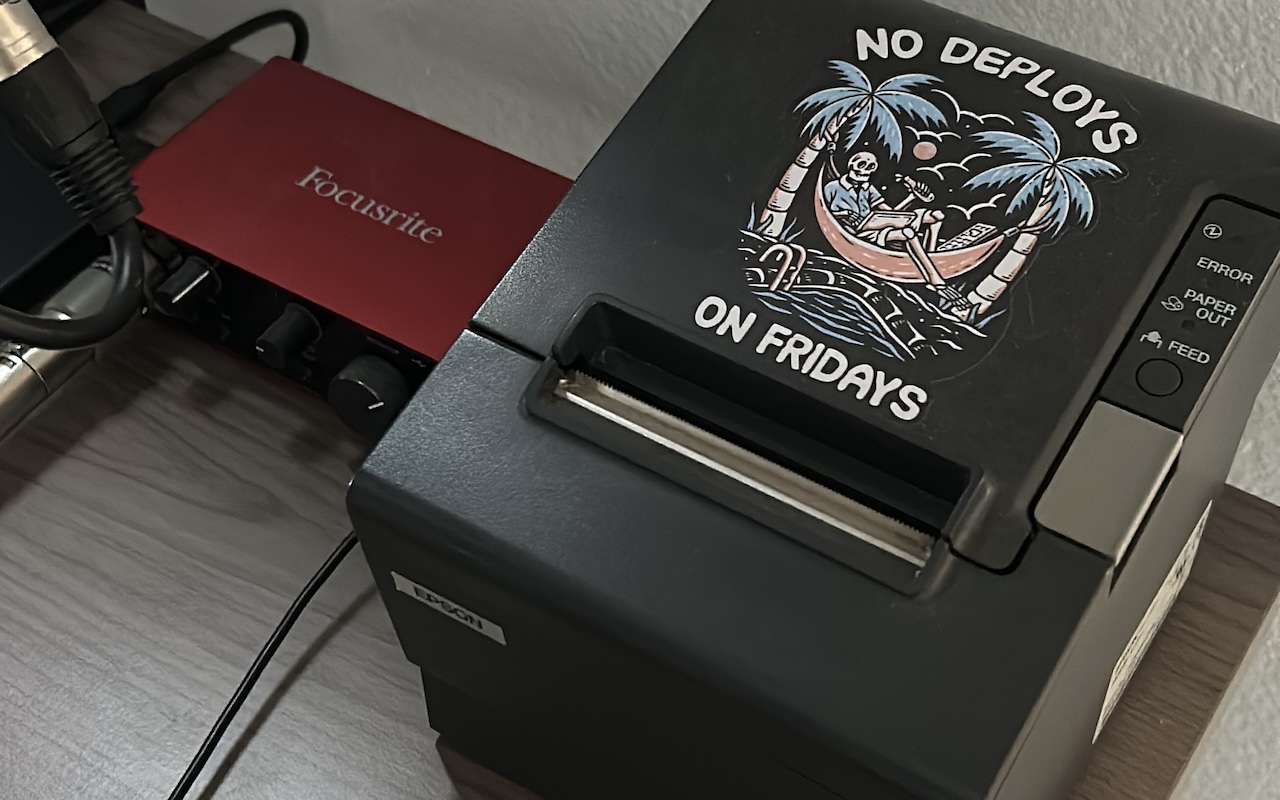
Situated at the corner of my desk is a receipt printer that I've used for other projects, so I figured that would make the perfect platform for short-form messages.
So I built it! ➡️ ping.aschmelyun.com
A page on my personal website where you can type up a message, and as soon as you hit send it's delivered and printed out right on my desk.
Here I'll go over how I set it up, how I'm communicating with this printer, some of the limitations I hit, and honestly just how surprisingly cool everyone was with the responses I've gotten so far.
If you want to watch this as a video instead, you can find it here on my YouTube channel.
The hardware
Let's talk first about the printer, and what I have it hooked up to.
This is my Epson TM-T88IV thermal receipt printer, and I got it off of eBay for about $50 USD. If you don't know how these work, it's pretty fascinating. Receipt paper is coated in a substance that reacts to heat. So instead of using ink to print, the print head heats up small areas of this paper line-by-line. This basically means that as long as the print head is functional, you'll never have to replace ink cartridges or ribbons.

In order to communicate with the printer, I need to send it commands in a specific format known as ESC/POS, a proprietary language that all (or, most?) Epson printers can understand.
Now unfortunately because of this printer's age, I can't get driver files for it. If I plug it in to my daily driver (a Mac Mini), the device itself is just totally unrecognized by my computer.
I can instead use some kind of intermediary hardware to handle communication that's more lax with peripherals. I chose a Raspberry Pi 4 that I had laying around, and the receipt printer is just plugged directly into an open USB port on it.
This makes the device available through the special file /dev/usb/lp0. You can write data directly to this file, and it'll be interpreted by the printer. I used this method for my dot matrix newspaper project last year.
But, I can't just write plain data to it, if I run something like this:
echo "Hello, world!" > /dev/usb/lp0
The printer writes out that line, but that's all it does. The paper isn't advanced (even if I supply newline characters) and it actually won't respond to any follow-up writes either. I need to find a way to easily create and send ESC/POS commands.
I've used PHP in the past for this because I enjoy the language, and there's a great package that exists for this specific purpose, so I'm reaching for both of these again.
In fact, I just built the whole site in PHP using the Laravel framework. It's definitely a bit of overkill, but I wanted some redundency by saving the messages to a database as well in case the printer went offline or ran out of paper. It was just easier to start this with a full-stack framework.
The website
So I created a new Laravel project, and put together a basic frontend view for the ping page. There's no JavaScript, all validation and requests happen server-side, the good ol' fashioned way.
After a user submits their message, it goes through a few steps to make sure that it's within the character count, contains some random transaction number, and doesn't contain any special characters.
$message = str_replace(['"', '“', '”', "'", '‘', '’'], ['"', '"', '"', "'", "'", "'"], $request->message);
$request->merge(['message' => $message]);
$request->validate([
'message' => 'required|max:1024|regex:/^[\x00-\x7F\']*$/',
'transaction' => 'required|max:5|min:5'
]);
Why? Well, because the printer I have kind of sucks with them. It has a pretty limited character set.
Out of the box using the built-in font that it comes with, it can print your standard alphabet and numbers, and the run-of-the-mill characters you'd find on a regular keyboard like dashes, dollar signs, and parentheses.
The more "fun" characters you'd find in ASCII art like box-drawing characters, symbols, shade and braille characters, and even emojis, don't have a valid character on this printer and just show up as an invalid symbol represented by a question mark (?).
So yeah, it's limited, but I figured I'd add that validation to make sure the message you're intending to send me is what shows up printed at my desk.
Note: I believe this printer does have multiple character sheets which have to be switched out via specific ESC/POS commands. The regular default sheet doesn't contain these characters, and I didn't feel like parsing incoming text, switching to a potentially supported sheet, running the command, and returning back. Maybe in version 2!
I also tried to match the width of the text box to the actual width used when printing (42 characters).
Now it was just a matter of sending a message in ESC/POS to the printer, which using this package was pretty straightforward. I start off with a basic header at the top, some date and transaction info, and then just put the entire message from the request into the payload.
$connector = new FilePrintConnector('/dev/usb/lp0');
$printer = new Printer($connector);
// header
$printer->feed(2);
$printer->text('TIMESTAMP:' . str_repeat(' ', 15) . now()->format('m/d/y h:i A'));
$printer->feed(1);
$printer->text('TRANSACTION #:' . str_repeat(' ', 23) . $request->transaction);
$printer->feed(4);
// message
$printer->text($request->message);
$printer->cut();
$printer->close();
$request->session()->flash('success', 'Your message was sent successfully, woohoo!');
It gets delivered directly to the printer through /dev/usb/lp0 and winds up at my desk! A little notice is flashed to the session and the page reloaded so the user knows their message was delivered successfully.
Now you may have noticed a small hiccup. This site is accessing the printer directly through the /dev/usb/lp0 file. If that's the case, how can I deploy this out to a server?
Spoiler alert: I didn't.
How I handled hosting
Originally I was going to handle this similarly to how I handled my previous receipt printer project. The main site would be hosted on a separate VPS and make secured calls to a thin client that would be running on whatever hardware I had the actual printer hooked up to.
This time, I decided to just skip the middle man. The site is hosted entirely on the Raspberry Pi that the printer is plugged in to.
Here's how I set it up and (hopefully, lol) secured it.
I packaged all of the site code into a Docker image, and am running it on the Pi exposing the :8000 port and binding the /dev/usb/lp0 file from the Pi to the container.
So now I can make a request in my local network to my Pi's IP address at the :8000 port, and I can see the site and print out a receipt.
For exposing it to the internet at large, I decided to go with Cloudflare Tunnels.
I already have this domain name set up with Cloudflare, so it kind of just made sense considering it's a free option that's just right there in front of me.
I had to install a daemon on the Raspberry Pi that runs in the background, and then it was just a matter of mapping what port I wanted to what subdomain on the existing domain it should connect to. Https and DNS was included and kicked off almost instantaneously.
That was it! Now I can visit ping.aschmelyun.com, and the Docker container running on my Raspberry Pi at my desk is what's serving the actual website.
Messages I've received
Since pushing this live and talking about it on Twitter, TikTok, and Bluesky, I've had an absolute outpouring of messages come through.
It's been about a month, and I've received well over a thousand different pings from people all around the world.

Now, most people would probably be a little hesitant about opening up a form on the internet and letting them leave completely anonymous messages with no filtering or regulation.
But I like the thrill of danger I guess, and imagine my surprise that the majority of responses have been overwhelmingly cool throughout this project.
Some of these messages include dope ASCII art, funny poems, recipes, memes and copypastas, and fake receipts.

A large portion of them included some kind of location, like "Hello from (state/country)". This prompted me to buy a large world map and pin each of their unique transaction numbers to the location mentioned in the message. So far I have about 200 pins from 40 different countries!

By far the biggest section of messages came from people who were telling me how much they enjoyed this simple act of anonymous connection through some kind of physical medium.
There's no real need for me to do this, it was fun and whimsical. It's the kind of stuff I wanted to see in the world, and so I made it a point to try and inject more of it.
That's about all there is to it.
I hope you enjoyed me talking about this project, if you want to take a look at the source code, it's all up on my GitHub.
If you want to tell me your thoughts, feel free to send me a message!.
Subscribe using the form below and about 1-2 times a month you'll receive an email containing helpful hints, new packages, and interesting articles I've found on PHP, JavaScript, Docker and more.