Introduction
Zram is a kernel module that utilizes a compressed virtual memory block device allowing for efficient memory management. In this document we will analyze the performance of various compression algorithms used in Zram and their impact on the system. We will also discuss the effects of different page-cluster values on the system’s latencies and throughput.
Compression Algorithm Comparison
The following table compares the performance of different compression algorithms used in Zram, in terms of compression time, data size, compressed size, total size, and compression ratio.
Data from Linux Reviews:
| Algorithm | Cp time | Data | Compressed | Total | Ratio |
|---|---|---|---|---|---|
| lzo | 4.571s | 1.1G | 387.8M | 409.8M | 2.689 |
| lzo-rle | 4.471s | 1.1G | 388M | 410M | 2.682 |
| lz4 | 4.467s | 1.1G | 403.4M | 426.4M | 2.582 |
| lz4hc | 14.584s | 1.1G | 362.8M | 383.2M | 2.872 |
| 842 | 22.574s | 1.1G | 538.6M | 570.5M | 1.929 |
| zstd | 7.897s | 1.1G | 285.3M | 298.8M | 3.961 |
Data from u/VenditatioDelendaEst:
| algo | page-cluster | MiB/s | IOPS | Mean Latency (ns) | 99% Latency (ns) | comp_ratio |
|---|---|---|---|---|---|---|
| lzo | 0 | 5821 | 1490274 | 2428 | 7456 | 2.77 |
| lzo | 1 | 6668 | 853514 | 4436 | 11968 | 2.77 |
| lzo | 2 | 7193 | 460352 | 8438 | 21120 | 2.77 |
| lzo | 3 | 7496 | 239875 | 16426 | 39168 | 2.77 |
| lzo-rle | 0 | 6264 | 1603776 | 2235 | 6304 | 2.74 |
| lzo-rle | 1 | 7270 | 930642 | 4045 | 10560 | 2.74 |
| lzo-rle | 2 | 7832 | 501248 | 7710 | 19584 | 2.74 |
| lzo-rle | 3 | 8248 | 263963 | 14897 | 37120 | 2.74 |
| lz4 | 0 | 7943 | 2033515 | 1708 | 3600 | 2.63 |
| lz4 | 1 | 9628 | 1232494 | 2990 | 6304 | 2.63 |
| lz4 | 2 | 10756 | 688430 | 5560 | 11456 | 2.63 |
| lz4 | 3 | 11434 | 365893 | 10674 | 21376 | 2.63 |
| zstd | 0 | 2612 | 668715 | 5714 | 13120 | 3.37 |
| zstd | 1 | 2816 | 360533 | 10847 | 24960 | 3.37 |
| zstd | 2 | 2931 | 187608 | 21073 | 48896 | 3.37 |
| zstd | 3 | 3005 | 96181 | 41343 | 95744 | 3.37 |
Data from my raspberry pi 4, 2gb model:
| algo | page-cluster | MiB/s | IOPS | Mean Latency (ns) | 99% Latency (ns) | comp_ratio |
|---|---|---|---|---|---|---|
| lzo | 0 | 1275.19 | 326448.93 | 9965.14 | 18816.00 | 1.62 |
| lzo | 1 | 1892.08 | 242186.68 | 14178.77 | 31104.00 | 1.62 |
| lzo | 2 | 2451.65 | 156905.52 | 23083.55 | 56064.00 | 1.62 |
| lzo | 3 | 2786.33 | 89162.46 | 42224.49 | 107008.00 | 1.62 |
| lzo-rle | 0 | 1271.53 | 325511.42 | 9997.72 | 20096.00 | 1.62 |
| lzo-rle | 1 | 1842.69 | 235863.95 | 14627.23 | 34048.00 | 1.62 |
| lzo-rle | 2 | 2404.35 | 153878.65 | 23592.19 | 60160.00 | 1.62 |
| lzo-rle | 3 | 2766.61 | 88531.46 | 42579.14 | 114176.00 | 1.62 |
| lz4 | 0 | 1329.87 | 340447.83 | 9421.35 | 15936.00 | 1.59 |
| lz4 | 1 | 2004.43 | 256567.19 | 13238.78 | 25216.00 | 1.59 |
| lz4 | 2 | 2687.75 | 172015.93 | 20807.00 | 43264.00 | 1.59 |
| lz4 | 3 | 3157.29 | 101033.42 | 36901.36 | 80384.00 | 1.59 |
| zstd | 0 | 818.88 | 209633.97 | 16672.13 | 38656.00 | 1.97 |
| zstd | 1 | 1069.07 | 136840.50 | 26777.05 | 69120.00 | 1.97 |
| zstd | 2 | 1286.17 | 82314.84 | 46059.39 | 127488.00 | 1.97 |
| zstd | 3 | 1427.75 | 45688.14 | 84876.56 | 246784.00 | 1.97 |
The table presents the performance metrics of different compression algorithms, including LZO, LZO-RLE, LZ4, and ZSTD. The metrics include throughput, compression ratio, and latency, which are important factors to consider for selecting the optimal compression algorithm.
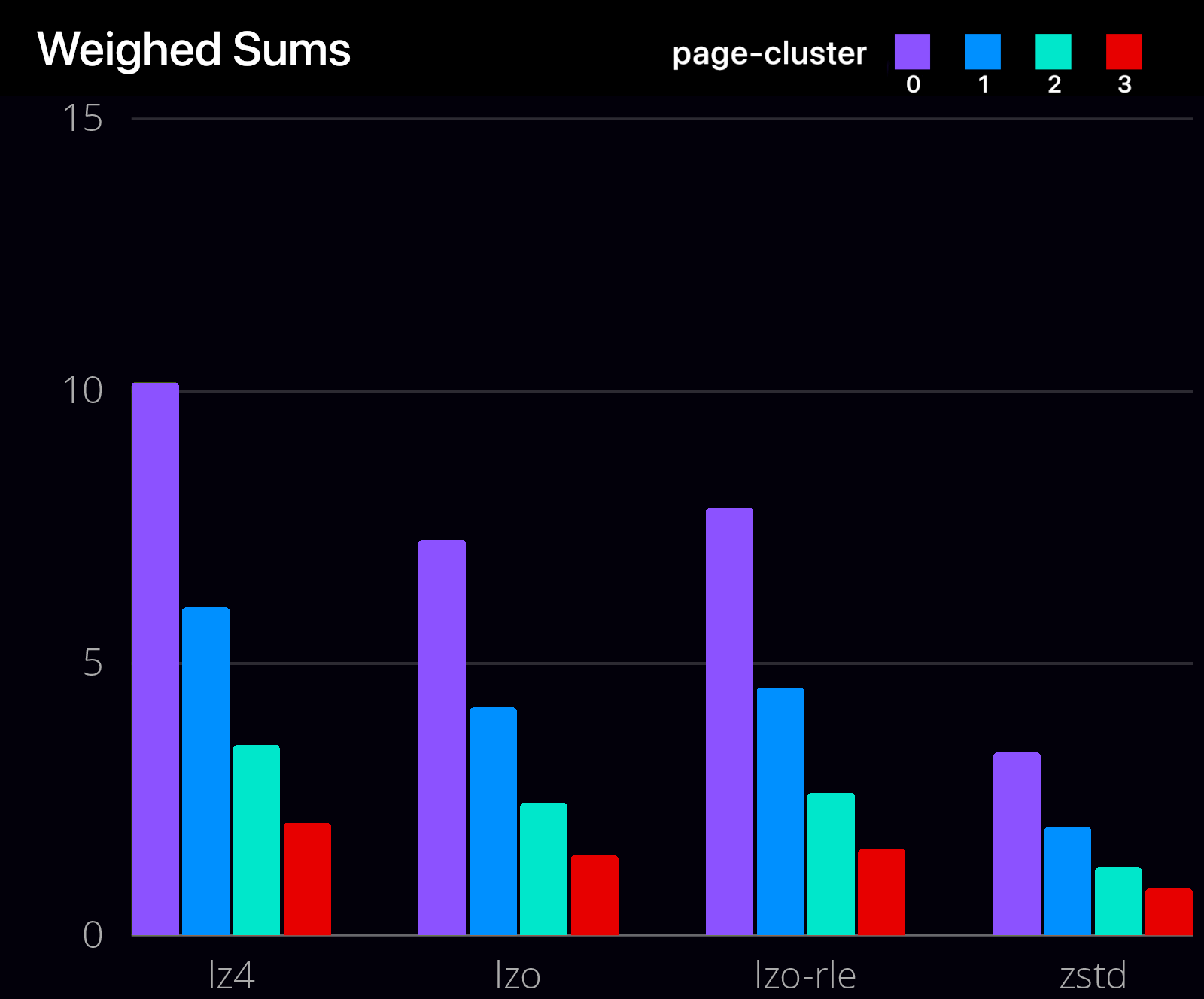
 We used a weighted sum to evaluate the performance of each algorithm and page cluster combination, with weights of 0.4 for latency, 0.4 for compression ratio, and 0.2 for throughput. The results show that LZ4 with page cluster 0 achieved the highest weighted sum, indicating that it is the optimal choice for this dataset. Overall, this evaluation provides valuable insights for selecting the most suitable compression algorithm for data storage and processing, balancing between compression ratio, throughput, and latency.
Code used to calculate weighed sums:
data = {
    ('lzo', 0): (5821, 2.77, 2428),
    ('lzo', 1): (6668, 2.77, 4436),
    ('lzo', 2): (7193, 2.77, 8438),
    ('lzo', 3): (7496, 2.77, 16426),
    ('lzo-rle', 0): (6264, 2.74, 2235),
    ('lzo-rle', 1): (7270, 2.74, 4045),
    ('lzo-rle', 2): (7832, 2.74, 7710),
    ('lzo-rle', 3): (8248, 2.74, 14897),
    ('lz4', 0): (7943, 2.63, 1708),
    ('lz4', 1): (9628, 2.63, 2990),
    ('lz4', 2): (10756, 2.63, 5560),
    ('lz4', 3): (11434, 2.63, 10674),
    ('zstd', 0): (2612, 3.37, 5714),
    ('zstd', 1): (2816, 3.37, 10847),
    ('zstd', 2): (2931, 3.37, 21073),
    ('zstd', 3): (3005, 3.37, 41343),
}

weights = {'latency': 0.4, 'ratio': 0.4, 'throughput': 0.2}

# Find the maximum value for each metric
max_throughput = max(x[0] for x in data.values())
max_ratio = max(x[1] for x in data.values())
max_latency = max(x[2] for x in data.values())

best_score = 0
best_algo = None
best_page_cluster = None

for (algo, page_cluster), (throughput, ratio, latency) in data.items():
    throughput_norm = throughput / max_throughput
    ratio_norm = ratio / max_ratio
    latency_norm = latency / max_latency
    score = weights['latency'] * (1 / latency_norm) + weights['ratio'] * ratio_norm + weights['throughput'] * throughput_norm
    print(f"{algo}, pagecluster {page_cluster}: {score:.4f}")
    if score > best_score:
        best_score = score
        best_algo = algo
        best_page_cluster = page_cluster

print(f"Best algorithm: {best_algo}")
print(f"Best page cluster: {best_page_cluster}")
Data from me:
Compiling memory intensive code (vtm ). Test was done on raspberry pi 4b, 2gb ram.
| algo | time |
|---|---|
| lz4 | 433.63s |
| zstd | 459.34s |
Page-cluster Values and Latency
The page-cluster value controls the number of pages that are read in from swap in a single attempt, similar to the page cache readahead. The consecutive pages are not based on virtual or physical addresses, but consecutive on swap space, meaning they were swapped out together.
The page-cluster value is a logarithmic value. Setting it to zero means one page, setting it to one means two pages, setting it to two means four pages, etc. A value of zero disables swap readahead completely.
The default value is 3 (8 pages at a time). However, tuning this value to a different value may provide small benefits if the workload is swap-intensive. Lower values mean lower latencies for initial faults, but at the same time, extra faults and I/O delays for following faults if they would have been part of that consecutive pages readahead would have brought in.


Conclusion
In the analysis of Zram performance, it was determined that the zstd algorithm provides the highest compression ratio while still maintaining acceptable speeds. The high compression ratio allows more of the working set to fit in uncompressed memory, reducing the need for swap and ultimately improving performance.
For daily use (non latency sensitive), it is recommended to use zstd with page-cluster=0 as the majority of swapped data is likely stale (old browser tabs). However, systems that require constant swapping may benefit from using the lz4 algorithm due to its higher throughput and lower latency.
It is important to note that the decompression of zstd is slow and results in a lack of throughput gain from readahead. Therefore, page-cluster=0 should be used for zstd. This is the default setting on ChromeOS and seems to be standard practice on Android.
The default page-cluster value is set to 3, which is better suited for physical swap. This value dates back to 2005, when the kernel switched to git, and may have been used in a time before the widespread use of SSDs. It is recommended to consider the specific requirements of the system and workload when configuring Zram.
https://docs.kernel.org/admin-guide/sysctl/vm.html
https://www.reddit.com/r/Fedora/comments/mzun99/new_zram_tuning_benchmarks/